6/11/2015

Remove Ads By WD From Chrome/ Firefox/ IE Effectively - Useful Methods for Ads By WD Removal


What is Ads By WD?


Ads By WD fall into the category of adware which can be really annoying and potentially harmful. It is deemed as an adware because it plays some suspicious activities which may do harm to users’ computer system as well as privacy. 

With Ads By WD on the computer, you may encounter many abnormal computer problems.

1. Pop-up ads, banner ads and similar commercial notifications constantly pop up to you while you are browsing on the Internet.
2. When you click on Ads By WD by accident, you will suddenly be redirected to some unknown websites.
3. It may also track your browsing habits so as to display more and more ads to you whatever webpage you are visiting.
4. Your computer running speed become more and more slow.
5. It is able to occupy all Internet browsers like Chrome, Firefox, IE so as to inject ads within your web browsers.
6. Additional unwanted free software may come along with Ads By WD without being noticed. This is also one of the reasons why your computer performance becomes poorer and poorer.


You Don't Have to Bear ArcadeHall Ads - Remove Adware in Right Ways

Information about ArcadeHall

ArcadeHall is classified as adware. Its homepage advertises well to attract game players. However its related adware is much more unwelcome because of the numerous ads it brings.


If you find pop-up, banners or in-text ads with the labels like" Powered by ArcadeHall", unfortunately your browser had been infected. Different kinds of ads will keep coming to bother you. They are associated to your recent search terms. It means that the adware is probably spying on your browsing activities. Your private privacy is no longer safe.The ads of ArcadeHall aim to promote related products like plug-ins and toolbars. The ads supporters profit from the increased web traffic. Advertisements will keep coming you if you don't remove the adware completely. You had better not click on the ads, to avoid getting unwanted programs to your computer. Removing ArcadeHall immediately is the right thing to do.

How does this adware come to your computer?

It may come to your browser bundled with other freeware, users blindly install it by clicking on every steps during the installation. To avoid such adware, you should be careful in installing programs, deselect the additional installations especially.

6/10/2015

Do Not Believe in instant-protection.com Pop-up - Stop Fake Security Alerts From Firefox, Chrome and IE

A Victim's Description


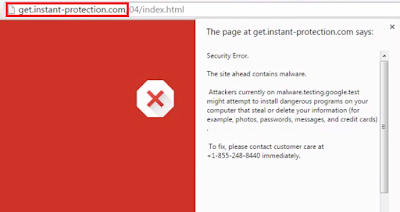
“When I try to open a news page as usual, a page of instant-protection.com pops up suddenly. It says "The site ahead contains malware, you are advised to call 1-855-248-8440 to fix the threats". I begin to worry about my personal financial information, and use a scanner to check my computer. But it seems nothing wrong in the scan results. I got confused. But the pop-up came again and again. What’s the problem, should I called the offered number?”

Know about instant-protection.com

Users should notice that this security alert of instant-protection.com is not real. This message is supported by an adware in your computer.Your browser may get infected with it after visiting malicious sites, or it can be hidden in freeware installations and installed by users mistakenly.


This is a common trick targeted inexperienced users. If you feel panic and call the given number, you will be required to pay for the so-called tech support sooner or later. What you should do is to stop instant-protection.com pop-up from disturbing you permanently.

You can try the free scanner to know about the real security condition of your computer.  

How to Remove Thirteen Degrees From Your Web Browsers? - Useful Methods for Thirteen Degrees Adware Removal

An Overview of Thirteen Degrees:


Thirteen Degrees is considered as an adware which mainly aims to inject ads into the webpages you are visiting. If you got this adware on your PC, then you may currently be bombarded with its overwhelming ads and underlined green text pop-ups when you are surfing online. Each time you hover over a underlined green text, an ad will pop-up to you. No matter what websites you are visiting, there are always a lot of annoying underlined green texts with linked ads in them and in any article you are reading. Although it is not malicious itself, it may cause much more computer threats if it stays in your computer system for a long time.

A Screenshot of Thirteen Degrees:

Remove Ads by Biggest Deals From Chrome/ Firefox/ IE - Completely Get Rid of Biggest Deals Adware

Does Biggest Deals keep showing up in your web browsers like Chrome, Firefox, IE? And you may ever try to delete it, but the next time you open your web browsers, it is back again. What is going on? What is Biggest Deals? How to get rid of it completely? Keep reading this post to know more about it and safeguard your PC from suspicious programs better.

What is Biggest Deals?


Biggest Deals, a browser extension, is considered as an adware which often display a lot of ads within the websites you are visiting, like savings, coupons, promo codes, deals and many other similar offers and products. Then, you are misled to visit unwanted advertisements, websites or download potentially harmful software. As you can see, it is really unreliable and annoying. With such an adware on your computer, your computer performance will not be accelerated but will be degraded greatly. Therefore, it is wise for you to remove it from your PC as early as you can once you find it.

A Screenshot of Biggest Deals:


6/09/2015

Remove PrimoSearch.com Browser Hijacker From Chrome/ Firefox/ IE - Best Way to Get Rid of PrimoSearch.com Completely

Each time you open a web browser installed in your computer, you are suddenly redirected to PrimoSearch.com. What is it? Should I remove it? How to get rid of its redirects completely? Read this post to know more about this website and properly protect your  PC better.

What is PrimoSearch.com Actually?


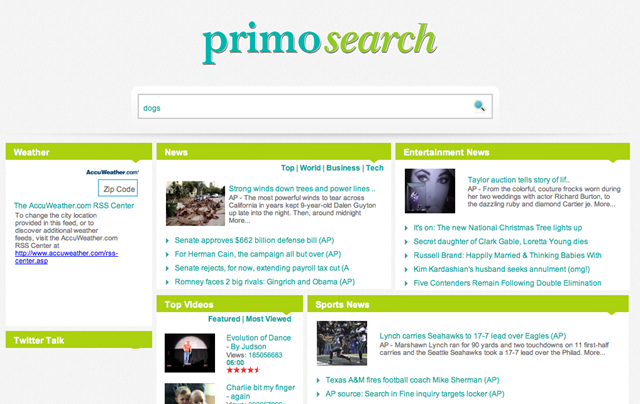
PrimoSearch.com belongs to the category of browser hijacker. It is able to alter your browser settings silently, such as Chrome, Firefox, IE, etc. Usually, this browser hijacker comes into your computer system along with free software especially those from unsafe sources. Therefore, you should download and install freeware online carefully. Once it manages to penetrate into your PC, it will attach itself to your web browsers as an ad-supported toolbar, extension or add-on automatically.
A Screenshot of PrimoSearch.com:


Solutions on Removing Windows-errorx.com Fake Alert Pop-up - Useful Windows-errorx.com Pop-ups Removal Instructions

The pop-up window from Windows-errorx.com says:

WARNING: Customer - Your browser and computer may be compromised by security threats. Call certified tech support personnel at 1-844-743-5314 now for IMMEDIATE assistance.

If you see such random pop-ups from Windows-errorx.com, then your computer is infected with an adware or a potentially unwanted program. The pop-up says that your browser and computer may be infected and not be protected. However, you should not trust what it says and not call the so-called tech support at 1-844-743-5314 promoted at this pop-up window because it is just a tech support scam. If you do as the pop-up says, then you will be one of the victims of financial scams. Now, what you need to do is to use a reputable and powerful anti-spyware application like SpyHunter to scan and detect your computer thoroughly for possible adware causing this fake alert pop-up. After detection, it is wise for you to remove it as soon as possible to safeguard your computer system from further damage. You can follow the removal guides below in this post.

A Screenshot of Windows-errorx.com: