Showing posts with label remove pop-up ads. Show all posts
Showing posts with label remove pop-up ads. Show all posts
7/31/2015
Remove Ads by BuyAndBrowse From Chrome/ Firefox/ IE With Effective Methods - Completely Get Rid of This Adware
BuyAndBrowse is labeled as an adware or a potentially unwanted program, called PUP for short. This adware-type application is advertised as a useful handy tool which can enhance your browsing experience. However, you should not trust its words easily which just aim to lure you into keeping or installing this app plug-in on your PC.

7/21/2015
Remove Ads by Lights Off From Chrome/ Firefox/ IE Completely - Get Rid of This Adware With Two Effective Methods
Are you seeing random pop-up ads/ advertising banners/ in-text ads by Lights Off when browsing online? If yes, then your computer might be infected with an adware or a potentially unwanted program, called PUP for short. Lights Off is an annoying and pesky adware program which can be downloaded onto your PC without being noticed while you open spam email attachments, visit corrupted websites, click on malicious links, or acquire other free downloads online from unsafe sources. Once installed, this adware will continuously bombard you with tons of pop-up ads, advertising banners, in-text ads, and promo codes whether you browse online stores or not. And these ads mainly aim to help its designer increase pagerank or sales. Besides, clicking on these ads powered by this adware, you will be redirected to unknown even unsafe websites which induce you into downloading potentially unwanted programs or fake updates.

Remove Ads by ZoolaGames From Web Browsers (Chrome/ Firefx/ IE) - Two Effective Methods to Get Rid of This Adware Completely
Seeing random pop-up ads by ZoolaGames means that your computer is infected with an adware or a potentially unwanted program. Can't get rid of these pop-up ads? Need help to solve this problem? This post is written for you, which will provide you step-by-step pop-up ads removal guides.
ZoolaGames is promoted as interesting application which can be downloaded from its official site and allows you to play addictive arcade PC game for free after you installed it onto your PC. However, it is highly recommended that you should not trust its words. Actually, this free application is not entertaining as advertised. It is just another adware-type application designed for advertising purposes such as promoting their online games. The same as most adware programs, this adware is also distributed as a bundled component of other free downloads online. This is the reason why it can enter your PC without being noticed.

7/16/2015
Remove Moviesfanatic.com From Chrome/ Firefox/ IE - Good Ways to Get Rid of This Browser Hijacker
Moviesfanatic.com is calssified as a potentially unwanted program and a browser hijacker, which is promoted via other free downloads from the Internet. Once installed, this browser hijacker is able to make modifications of your browser settings, homepage, and default search engine, then take over your web browsers thoroughly. And this is the reason why you are always redirected to its homepage - moviesfanatic.com without any approval whenever you open a new tab of Internet Explorer, Google Chrome, or Firefox.
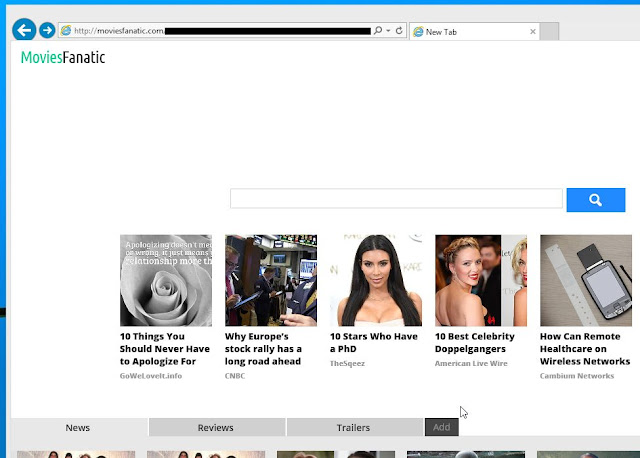
If your web browsers are hijacked by Moviesfanatic.com, then you have to bear many annoying things like these:
Therefore, if you want to get access to your preferred websites again and surf the Internet smoothly, you need to remove Moviesfanatic.com from your computer completely and reset your web browsers. And, the following passage is going to show you how to remove this browser hijacker from your PC efficiently and completely.
If your web browsers are hijacked by Moviesfanatic.com, then you have to bear many annoying things like these:
- Often being redirected to Moviesfanatic.com homepage or other unknown websites all of a sudden;
- Cannot get the related search results you desired when searching something on this search engine;
- Annoying pop-up ads are all with your web browsers;
- Your PC runs slower and slower as a snail as time goes by;
- Difficult to get access to your preferred websites;
- Sometimes, browser/ system crash happens.
7/15/2015
Remove Ads by FusionPlayer From Chrome/ Firefox/ IE - Completely Delete Unwanted Pop-up Ads
FusionPlayer is promoted as a useful tool which claims to enhance your browsing experience while watching TV on your computer. However, you should not be fooled by its words. As a matter of fact, it is just an ad-supported program designed by cyber criminals to promote their services or products online illegally. To achieve their marketing purposes, they utilize this ad-supported platform to deliver numerous pop-up ads, banner ads and many other similar things within users' web browsers without any approval. Needless to say, their aim is to generate pay-per-click or pay-per-install revenue.
Moreover, to get more clicks, FusionPlayer can create cookies to record users' browsing histories and collect their personal online information so as to generate more personalized ads to draw your attention and get more clicks. However, most of time those so-called personalized ads are not related to your need and interests.
What is worse, each click on ads by this adware may mean a risk of visiting a suspicious website linked to third parties. If you click on them, you may get nothing useful but introduce many other computer threats which may mess up your computer system. Therefore, you should not click on ads powered by FusionPlayer no matter how attractive and useful they look like. And what you need to do is to take actions to remove this adware from your PC timely once you find it.
7/14/2015
Can't Remove Websearch.hotfindings.info Browser Hijacker? - Guide to Get Rid of This Browser Hijacker Completely
Websearch.hotfindings.info can cause a lot of trouble:
- The random changes to registry editors will result in many other corrupted Windows registry keys. Thus, it can automatically re-execute each operating system startup.
- Fake computer scan will constantly pop up a message that your PC faces some computer threats.
- It may steal your personal confidential information to the remote hackers, like your online login information, banking records, credit cards, IP address and many other online information.
- Web browsers becomes vulnerable. As a result, more and more computer threats come into the infected machine without any approval.
- You will often be redirected to other unknown websites all of a sudden when you are visiting or searching something in a website.
- Numerous ads will flood into your PC constantly.
What Is Websearch.hotfindings.info Actually?
Websearch.hotfindings.info is categorized as a browser hijacker, which is able to alter your browser settings silently, such as Chrome, Firefox, IE, etc. Usually, this browser hijacker comes into your computer system along with free software especially those from unsafe sources. Therefore, you should download and install freeware online carefully. Once it manages to penetrate into your PC, it will attach itself to your web browsers as an ad-supported toolbar, extension or add-on automatically.

If Websearch.hotfindings.info stays on a computer for a long time, it can lead to many other dangerous results, such as poor computer performance, browser crash, system freezing, blue screen, unstable Internet connection, and additional malware infections, and so on. As you can see, this browser hijacker is really dangerous and harmful. Therefore, if your computer is unfortunately infected with this browser hijacker, you should remove it from your PC without any delay.
7/13/2015
Remove CoupCoup Pop-up Ads From Chrome/ Firefox/ IE - The Effective Pop-up Ads Removal Solutions
Seeing random pop-up ads by CoupCoup means that your computer is infected with an adware or a potentially unwanted program, called PUP for short. Need help to get rid of these pop-up ads? This post is right for you.
If your computer is infected with CoupCoup, you may find that something abnormal often happens to your computer.
If your computer is infected with CoupCoup, you may find that something abnormal often happens to your computer.
- Some unknown browser add-ons, extensions, toolbars, and plugins are installed on your PC without any notifications.
- Somehow you are redirected to other irrelevant websites without any approval.
- Tons of pop-up ads, advertising banners, in-text ads are displayed within the webpages you are visiting whether you want them or not.
- Sometimes, you may find it difficult to get access to certain websites you prefer.
- As time goes by, you will find that your PC runs slower and slower as a snail.
How to Remove 4fiile.com Pop-up Ads From Chrome/ Firefox/ IE? - Useful Pop-up Ads Removal Guide
4fiile.com is detected as a potentially active malware online, which might be able to cause much trouble to you. Seeing random popups from this domain means that your computer might be infected with an ad-supported extension. With an ad-supported extension on your PC, whenever you open a new tab of your web browser, an ad from 4fiile.com will pop up. Here, it is highly recommended that you should not trust the pop-up ads from this domain because these popups are usually designed to promote fake video player/ browser update downloads, and spread tech support scam. In a word, currently this domain is unreliable and unsafe. For the sake of security, once you see popups from this domain, you are suggested to use a reputable and powerful antivirus application like SpyHunter to scan and detect your PC thoroughly for possible malware associated with this domain.
The following passage will show you how to remove this domain from computer system easily and thoroughly. There are THREE effective solutions provided below. You can choose any one removal method you prefer to complete this removal task.
Tips for Preventing 4fiile.com:
- Update your antivirus software regularly.
- Do not download and install freeware from unsafe sources.
- Do not open junk mails or suspicious email attachments.
- Do not click on unknown links or ads from social networking sites easily.
- You should always scan the removable storage medium before using it.
- Make backups for your important files regularly.
The following passage will show you how to remove this domain from computer system easily and thoroughly. There are THREE effective solutions provided below. You can choose any one removal method you prefer to complete this removal task.
7/08/2015
Help to Remove Dealday Pop-up Ads From Chrome/ Firefox/ IE - Best Pop-up Ads Removal Solutions
Seeing random pop-up ads by Dealday means that your computer is currently infected with an adware or a potentially unwanted program. And you will find that your PC acts abnormally and something unusual happens when you surf the web.
- Some unknown browser add-ons, extensions, toolbars, and plugins are installed on your PC without any notifications.
- Somehow you are redirected to other irrelevant websites without any approval.
- Tons of pop-up ads, advertising banners, in-text ads are displayed within the webpages you are visiting whether you want them or not.
- Sometimes, you may find it difficult to get access to certain websites you prefer.
- As time goes by, you will find that your PC runs slower and slower as a snail.
7/02/2015
Guide to Remove Web Flipper Thoroughly - Easy Adware Removal Instructions
Web Flipper, deemed as an annoying and stubborn adware, can be installed via spam email attachments, irregular freeware downloads, etc. The application is not a malicious virus itself, which cannot do harm to your computer itself. However, some people deem the program as an adware because of its constant pop-up ads banners, redirects, etc. When people are browsing their webpage, constant pop-up ads by Web Flipper disturb their online activities, which make them annoying.
Ads by Web Flipper - A Big Trouble to Your PC:
Although Web Flipper is not malicious itself, but it may be utilized by some bad guys to play vicious actions which may cause other troubles to your computer. If it keeps showing up endless ads on your browsers, your browser as well as computer performance will be degraded greatly. What is worse, it may hijack your web browsers such as Google Chrome, Mozilla Firefox, and Internet Explorer, etc via your freeware downloads from irregular websites.
And the pop-up ads by Web Flipper are most likely to be sponsored by third parties who aim at making money via pay-per-click system. Thus, some ads may contain malicious links which may mislead you to some unknown even unsafe websites. In addition, it may record your browsing activities to collect your important information such as PC’s IP address, all kinds of online accounts as well as passwords, banking records, etc. As a result, your information may be used to play some vicious actions which may cause a big loss in privacy as well as money.
Completely Remove Ads by PCoupoon in Easy Ways - Best Adware Removal Help
What is PCoupoon?
PCoupoon, a browser extension, is considered as an adware which often display a lot of ads within the websites you are visiting, like savings, coupons, promo codes, deals and many other similar offers and products. Then, you are misled to visit unwanted advertisements, websites or download potentially harmful software. As you can see, it is really unreliable and annoying. With such an adware on your computer, your computer performance will not be accelerated but will be degraded greatly. Therefore, it is wise for you to remove it from your PC as early as you can once you find it.
7/01/2015
Can't Remove Ads by DealBarium? - Best Adware Removal Guide
What is DealBarium Actually?
DealBarium is an ad-supported program designed by cyber criminals to promote their services or products online illegally. They utilize this ad-supported platform to deliver numerous pop-up ads, banner ads and many other similar things within users' web browsers without any approval. Needless to say, their aim is to make great profits by pay-per-click.
To get more clicks, this adware is given the ability to record users' browsing histories and collect their personal online information so as to generate more personalized ads to draw your attention and get more clicks. However, most of time those so-called personalized ads are not related to your need and interests. Moreover, each click on ads by this adware may mean a risk of visiting a suspicious website linked to third parties. If you click on them, you may get nothing useful but introduce many other computer threats which may mess up your computer system. Therefore, you should not click on ads powered by DealBarium no matter how attractive and useful they look like.
DealBarium is an adware which usually comes into users' computer system along with freeware especially those from unsafe sources. Adware developers often bundle their adware programs with freeware installation. Therefore, to safeguard your PC from adware or other potentially unwanted programs, you are suggested to pay much attention to freeware download and installation online. If you find it in your PC, please take actions to remove this adware from your computer immediately.
DealBarium is an adware which usually comes into users' computer system along with freeware especially those from unsafe sources. Adware developers often bundle their adware programs with freeware installation. Therefore, to safeguard your PC from adware or other potentially unwanted programs, you are suggested to pay much attention to freeware download and installation online. If you find it in your PC, please take actions to remove this adware from your computer immediately.
6/29/2015
Guide to Remove Ads by PriceChomper - Best Adware Removal Instructions
What is PriceChomper?
PriceChomper, a browser extension, is considered as an adware which often display a lot of ads within the websites you are visiting, like savings, coupons, promo codes, deals and many other similar offers and products. Then, you are misled to visit unwanted advertisements, websites or download potentially harmful software. As you can see, it is really unreliable and annoying. With such an adware on your computer, your computer performance will not be accelerated but will be degraded greatly. Therefore, it is wise for you to remove it from your PC as early as you can once you find it.
6/17/2015
Best Way to Remove Ads by Digisaver - Easily Get Rid of Adware Completely
Digisaver Can Be Very Annoying
6/16/2015
Guide to Remove Ads by Filter Results - Easy Way to Get Rid of Adware Completely
An Overview of Filter Results:
Filter Results is promoted as a useful
tool which promises to provide you with various coupons, deals, promo codes
while you are shopping online. However, you should not fooled by its words. If
you really believe that it is a useful tool as advertised, then you are wrong.
As a matter of fact, it is just an adware-type application designed for
marketing purposes. Once installed, it will display various advertising
banners, pop-up ads, in-text ads within the webpages you are visiting whether
you want them or not.

6/12/2015
Help to Remove Ads By HQ Video Pro 2.1cV11.06 - Pop-up Ads Removal Solutions
When you are surfing online, "Ads by HQ Video Pro 2.1cV11.06", "Brought by HQ Video Pro 2.1cV11.06", "Powered by HQ Video Pro 2.1cV11.06", and "HQ Video Pro 2.1cV11.06 Ads" keep showing within the web page you are visiting? What is wrong with my computer? How to get rid of such pop-up ads? Is HQ Video Pro 2.1cV11.06 a virus? Should I remove it? How to remove it? Read this post to know more about it and protect your PC from the latest computer viruses better.
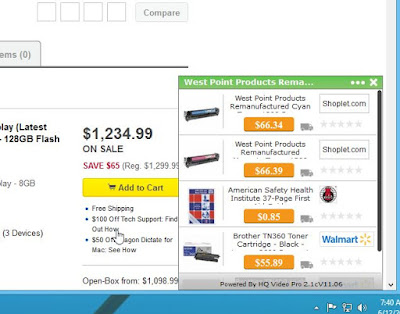
HQ Video Pro 2.1cV11.06, considered as a PUP or an adware, is an ad-supported program which usually appears as toolbar or browser extension within your web browsers like chrome, IE, Firefox. This adware usually secretly comes into the target computer along with freeware, especially those from unsafe sources. Once it manages to penetrate into your PC, it will bombard you with endless annoying in-text ads, banner, pop-under, or pop-up ads. There is no doubt that it is just an unreliable program made for marketing purposes. To win more users' clicks and visits, HQ Video Pro 2.1cV11.06 will generate many personalized ads according to your browsing habits. As you can see, this adware has the potential to to expose your privacy to the public even to the hackers. Therefore, you should take actions to remove this adware from your computer as soon as possible.
What is HQ Video Pro 2.1cV11.06 Actually?
6/11/2015
Remove Yourtrustedoffer.com Pop-up From Chrome/ Firefox/ IE - Effective Removal Help for XP/ Win 7/ Win 8 Users
What is Yourtrustedoffer.com?
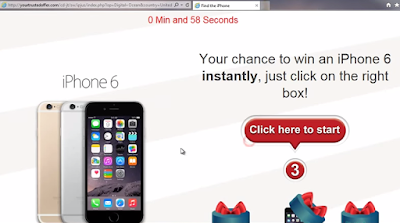
Yourtrustedoffer.com, an advertising platform, is utilized by adware as well as other malicious programs to display pop-up ads within users' web browsers like Firefox, Internet Explorer and Google Chrome. Very often, when you click on several links in various sites, a pop-up window or a new tab of Yourtrustedoffer.com displays within your web browsers installed on the PC, then your computer may be currently infected with an adware or a potentially unwanted program (PUP). Technically, this domain is not a malicious itself; however cyber criminals are using an adware program to display ads from this domain to get pay-per-click advertising profits.
Remove Ads By WD From Chrome/ Firefox/ IE Effectively - Useful Methods for Ads By WD Removal
What is Ads By WD?
Ads By WD fall into the category of adware which can be really annoying and potentially harmful. It is deemed as an adware because it plays some suspicious activities which may do harm to users’ computer system as well as privacy.
With Ads By WD on the computer, you may encounter many abnormal computer problems.
1. Pop-up ads, banner ads and similar commercial notifications constantly pop up to you while you are browsing on the Internet.
2. When you click on Ads By WD by accident, you will suddenly be redirected to some unknown websites.
3. It may also track your browsing habits so as to display more and more ads to you whatever webpage you are visiting.
4. Your computer running speed become more and more slow.
5. It is able to occupy all Internet browsers like Chrome, Firefox, IE so as to inject ads within your web browsers.
6. Additional unwanted free software may come along with Ads By WD without being noticed. This is also one of the reasons why your computer performance becomes poorer and poorer.
6/10/2015
How to Remove Thirteen Degrees From Your Web Browsers? - Useful Methods for Thirteen Degrees Adware Removal
An Overview of Thirteen Degrees:
A Screenshot of Thirteen Degrees:

Remove Ads by Biggest Deals From Chrome/ Firefox/ IE - Completely Get Rid of Biggest Deals Adware
Does Biggest Deals keep showing up in your web browsers like Chrome, Firefox, IE? And you may ever try to delete it, but the next time you open your web browsers, it is back again. What is going on? What is Biggest Deals? How to get rid of it completely? Keep reading this post to know more about it and safeguard your PC from suspicious programs better.
What is Biggest Deals?
Biggest Deals, a browser extension, is considered as an adware which often display a lot of ads within the websites you are visiting, like savings, coupons, promo codes, deals and many other similar offers and products. Then, you are misled to visit unwanted advertisements, websites or download potentially harmful software. As you can see, it is really unreliable and annoying. With such an adware on your computer, your computer performance will not be accelerated but will be degraded greatly. Therefore, it is wise for you to remove it from your PC as early as you can once you find it.
A Screenshot of Biggest Deals:

A Screenshot of Biggest Deals: