Showing posts with label delete pop-up ads. Show all posts

7/29/2015

Completely Remove Solvemypc1.net Pop-up Ads From Chrome/ Firefox/ IE in Effective Ways

Solvemypc1.net- A Malicious Scam Website!


Solvemypc1.net is labeled as a pesky tech support scam website which can break into your computer system sneakily when you open spam email attachments, visit risky or corrupted websites, click on malicious links, or download freeware or shareware from unsafe sources online.

Typically, seeing random Solvemypc1.net pop-up ads on your screen means that your PC might currently infected with an adware or a potentially unwanted program, called PUP for short. Popups from this website state that your PC is infected with some kind of malware, and your computer system as well as privacy might not be protected. So, you need to call their tech support at the hotline promoted the popups. However, you should never trust its words because this is just a online tech support scam we often hear about. In fact, what problem you need to solve urgently is to remove Solvemypc1.net from your PC completely once you find it, instead of giving money to those bad guys who design this scam.

7/27/2015

Remove Ads by shopperz22072015 From Chrome/ Firefox/ IE Completely in Effective Removal Methods


Ads by shopperz22072015 keep showing up within the web pages you visit? Can't get rid of these pop-up ads? If you are looking an effective way to remove pop-up ads from your computer completely, please read this post and follow the removal guides below which can help you get out of this trouble effectively and thoroughly. 

Ads by shopperz22072015 are supposedly caused by an ad-supported extension which is mainly designed for advertising purposes. Most commonly, an ad-supported extension is developed to help some people make great profits online. You might get such a potentially unwanted extension onto your PC unwittingly when you open spam email attachments, click on malicious links, visit corrupted, risky websites, or download freeware or shareware from unsafe sources online. Once installed, it can cause lots of trouble to you.

7/26/2015

Best Tips to Remove Traffikkim.xyz Pop-up Ads From Chrome/ Firefox/ IE - Useful Removal Guide


 What is Traffikkim.xyz? 


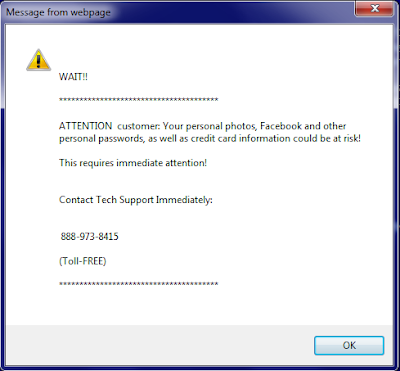
 A screenshot of this website here:


All of a sudden, Traffikkim.xyz pops up to you without any approval. And this pop-up window states that your personal potatoes, Facebook and other personal passwords, as well as credit card information could be risk, and you should contact tech support immediately at 888-973-8415 toll-free promoted at this pop-up window. You might feel worried about your personal information very much when you see this pop-up message, and call the tech support at the toll-free number promoted at this domain. If yes, then you may suffer from a great loss of money and put your PC as well as privacy at risk because it is just a tech support scam designed to take innocent computer users' money.

7/21/2015

Guide to Get Rid of Dealingapp From Computer Quickly and Completely - Best Removal Help Here


Complainer:

" Hi everyone!


It's my first time to post - I would like to ask some advice or leads.

I have Kapersky Total Security (KTS) for our small business as a trial. I run 15 computers but two i'm working on are severely infected by dealingapp malware.

My KTS seem to be unsuccessful in removing it.

Any suggestions?"


If you encounter the same problem as the complainer above, please read this post which shows you detailed information about Dealingapp as well as step-by-step removal guides. Then, follow the removal guides below, and you will solve the problem thoroughly.

Get Rid of Ads by Rinkela From Chrome/ Firefox/ IE - Completely Remove This Adware in Effective Ways

Random pop-up ads by Rinkela keep delivering within your web browser? If yes, then your computer might be infected with an adware or a potentially unwanted program, called PUP for short. Want an effective way to get rid of this pop-up ads from computer? Please read this post which provides you with useful step-by-step removal guides. 

Rinkela is classified as an adware or a potentially unwanted program, which is usually promoted with a help of third party software as an optional component. Once installed, it can display lots of annoying pop-up ads, advertising banners, in-text ads and underlined words within the web pages you are browsing, like commercial websites. Besides, this adware even starts bombard you with these ads as soon as you open the web browser, such as Google Chrome, Firefox, IE, etc.

7/14/2015

How to Remove Home.sweetim.com From Chrome/ Firefox/ IE? - Completely Get Rid of This Browser Hijacker in Effective Ways


Often being redirected to Home.sweetim.com means that your web browsers are being hijacked. Looking for an effective way to solve this problem? 

Home.sweetim.com is classified as a potentially unwanted program, called PUP for short, and a browser hijacker. At first sight, this seems like a normal and legitimate search engine. As a matter of fact, it has the same capabilities as a browser hijacker which can cause much trouble to online computer users.

Once installed, this browser hijacker is able to modify your browser settings, change your homepage to its own site, alter your default search engine, and then take over your web browsers completely. If your web browsers are hijacked by Home.sweetim.com, you will find that you are often redirected to this homepage all of sudden whenever you open a new tab of your web browsers like Internet Explorer, Google Chrome, Firefox. Besides, when you search something on this search engine, you cannot get the related search results you desired but sponsored links. When you click on some search results, you will be induced into visiting other unknown websites. As you can see, Home.sweetim.com is just an ad-supported platform designed for advertising purposes, which helps third parties increase their page rank or sales.

Help to Remove pcwindows-critical-alert.info Pop-up Ads From Common Web Browsers - The Effective Pop-up Ads Removal Solutions

Seeing random popups from pcwindows-critical-alert.info? Need help to get rid of these pop-up ads? This post is right for you.

pcwindows-critical-alert.info pop-up ads are caused by an ad-supported extension which is usually added when you install other free downloads from the Internet. Technically speaking, this domain is not malicious itself, but it is utilized as an ad-platform spreading tech support scam. This is one of the reasons why it is considered as a malicious domain. Moreover, it is reported that popups from this domain may contain malicious codes which is able to introduce many other computer infection onto your PC without any approval.

Popups from pcwindows-critical-alert.info state that your computer is infected and you should call the tech support promoted on the popups to solve the problem immediately. However, it is highly recommended that you should not trust popups from this domain and not call their so-called tech support at the phone number promoted on popup. If you do as the pop-ups say, you will suffer from a great loss of time, money even put your computer at risk. Once you call the tech support, you will be asked to pay a sum of money for the tech support. However, it is disappointing that they will not solve the problem for you after the payment. So, you should keep in mind that this is just a tech support scam and it cannot bring anything good for you but cheat you money. 

In short, pcwindows-critical-alert.info should be removed from your PC immediately to safeguard your computer system from further damage.

7/12/2015

Guide to Remove CouponJumbo Pop-up Ads - Best Adware Removal Help

Seeing random pop-up ads by CouponJumbo means that your computer is infected with an adware or a potentially unwanted program, called PUP for short. Need help to get rid of these pop-up ads? This post is right for you. 

CouponJumbo is categorized as an adware, which is utilized as an ad-platform associated with third party. This adware program is mainly designed for advertising purposes. When installed, this malicious browser extension will display lots of pop-up ads within the webpages you visit whether you want them or not. And these ads aim to promote predetermined websites, services, products, etc.


As time goes by, you will suffer from many other computer problems as follows if this adware stays on your PC for a long time.
  • Other unknown browser add-ons, extensions, toolbars, and plugins are installed on your PC without any notifications.
  • Somehow you are redirected to other irrelevant websites without any approval.
  • Tons of pop-up ads, advertising banners, in-text ads are displayed within the webpages you are visiting whether you want them or not.
  • Sometimes, you may find it difficult to get access to certain websites you prefer.
  • As time goes by, you will find that your PC runs slower and slower as a snail.

It is time to remove CouponJumbo from your PC.

  • To get rid of these pop-up ads, you should remove this adware from your computer system completely. 
  • To protect your personal online information, you should remove this adware from your device timely. 
  • To bring back a normal PC, you also should remove this adware from your machine thoroughly.

Can't Remove Fastsoftwarejava.com Pop-up Ads From Web Browsers? - Guide to Get Rid of Popups Efficiently and Completely


The popup at Fastsoftwarejava.com says that:

"WARNING: Your Current Browser Is Outdated!

A critical security update has been released and you are required to update your Java Player.

This page will automatically close once the security update has been installed."


Fastsoftwarejava.com is detected as a potentially active malware, which can do harm to computer system once installed. Pop-up ads from this domain are caused by an ad-supported extension, which mainly aims to promote fake Java Player updates to computer users online. If you believe what the popup says and install the Java Player update, then you will get nothing useful but one more ad-supported extension. Then, you will suffer from more and more popups, redirects even computer infection. Therefore, to protect your PC from further damage, it is highly recommended that you should not download and install the Java Player promoted on this website.

As you can see, Fastsoftwarejava.com is a malicous website used as an ad-platform to generate pay-per-click or pay-per-install revenue illegally. To make great profits, it may do something harmful and cause much trouble to the innocent computer users. Hence, it will be advisable for you to remove this nasty domain from your PC immediately once you find it; it is not a good thing for you.

7/07/2015

Need Help to Remove Ads by Adcloud From Web Browsers? - Best Adware Removal Solutions

Adcloud is considered as an adware which aims to display ads within the webpages you are visiting so as to help its designers generate pay-per-click or pay-per-install revenue. If you got this adware on your PC, then you may currently be bombarded with its overwhelming ads and underlined green text pop-ups when you are surfing online. Each time you hover over a underlined green text, an ad will pop-up to you. No matter what websites you are visiting, there are always a lot of annoying underlined green texts with linked ads in them and in any article you are reading. Although it is not malicious itself, it may cause much more computer threats if it stays in your computer system for a long time. Therefore, to safeguard your PC from further damage, it is advisable for you to remove Adcloud from your PC immediately once you find it.

6/29/2015

Guide to Remove Ads by PriceChomper - Best Adware Removal Instructions


What is PriceChomper?


PriceChomper, a browser extension, is considered as an adware which often display a lot of ads within the websites you are visiting, like savings, coupons, promo codes, deals and many other similar offers and products. Then, you are misled to visit unwanted advertisements, websites or download potentially harmful software. As you can see, it is really unreliable and annoying. With such an adware on your computer, your computer performance will not be accelerated but will be degraded greatly. Therefore, it is wise for you to remove it from your PC as early as you can once you find it.

Help to Remove Fresh Outlook Adware - Best Removal Help Here

What is Fresh Outlook?


Fresh Outlook is considered as an adware which mainly aims to inject ads into the webpages you are visiting. If you got this adware on your PC, then you may currently be bombarded with its overwhelming ads and underlined green text pop-ups when you are surfing online. Each time you hover over a underlined green text, an ad will pop-up to you. No matter what websites you are visiting, there are always a lot of annoying underlined green texts with linked ads in them and in any article you are reading. Although it is not malicious itself, it may cause much more computer threats if it stays in your computer system for a long time.

6/17/2015

Easy Way to Remove Ads by CutterInit - Best Adware Removal Help


An Overview of CutterInit:


CutterInit is a suspicious ad-supported extension which is compatible with Internet Explorer, Mozilla Firefox, Google Chrome and other web browsers. The same as most adware programs, this adware can display lots of pop-up ads within your web browser suddenly without any approval. Then, pop-ups displays within the webpages you are visiting or you may be redirected to other unknown websites. Even if you try to change another web browser, there are still pop-ups within the browser because this nasty adware has modified your default Internet browsers homepage URL.

6/15/2015

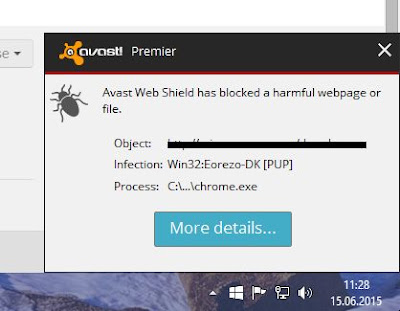
Guide to Remove Win32:Eorezo-DK [PUP] - Useful Adware Removal Help


Win32:Eorezo-DK [PUP] is considered as a potentially unwanted program (PUP) or an adware which has the ability to display pop-up ads, advertising banners, in-text ads, underlined key words and other forms of advertisements on the web pages you are visiting whether you want them or not. All these ads are mainly designed to promote some doubtful services and products like some unwanted web browser toolbars, fake updates or potentially harmful software so as to help their designers generate pay-per-click revenue.

6/08/2015

Remove ArcadeTwist Ads From Chrome/ Firefox/ IE Completely - Effectively Remove ArcadeTwist With Simple Steps

Many computer users complained that when surfing online, they are hit by many new tabs with ads, pop-up advertising boxes, random text underlined and planted with hyperlinks from ArcadeTwist. What is it? Is it dangerous? How to remove it? Read this post to know more about it and safeguard your PC from the latest computer viruses better.

Details on ArcadeTwist:


ArcadeTwist is promoted as a useful tool which claims to enhance your browsing experience on arcadetwist.com. However, you should not be fooled by its words. As a matter of fact, it is just an adware which usually comes into users' computer system along with freeware especially those from unsafe sources. Adware developers often bundle their adware programs with freeware installation. Therefore, to safeguard your PC from adware or other potentially unwanted programs, you are suggested to pay much attention to freeware download and installation online.

What is more, ArcadeTwist is an ad-supported program designed by cyber criminals to promote their services or products online illegally. They utilize this ad-supported platform to deliver numerous pop-up ads, banner ads and many other similar things within users' web browsers without any approval. Needless to say, their aim is to make great profits by pay-per-click.

What is worse, to get more clicks, this adware is given the ability to record users' browsing histories and collect their personal online information so as to generate more personalized ads to draw your attention and get more clicks. However, most of time those so-called personalized ads are not related to your need and interests. Moreover, each click on ads by this adware may mean a risk of visiting a suspicious website linked to third parties. If you click on them, you may get nothing useful but introduce many other computer threats which may mess up your computer system. Therefore, you should not click on ads powered by ArcadeTwist no matter how attractive and useful they look like.

A Screenshot of ArcadeTwist Ads:

6/01/2015

Remove Ads by DiscountyFrenz1.2 From Chrome/ Firefox/ IE Effectively - Completely Remove DiscountyFrenz1.2 With Simple Methods

When you are surfing online, "Ads by DiscountyFrenz1.2", "Brought by DiscountyFrenz1.2", "Powered by DiscountyFrenz1.2", and "DiscountyFrenz1.2 Ads" keep showing within the web page you are visiting? What is wrong with my computer? How to remove such pop-up ads? Is DiscountyFrenz1.2 a virus? Should I remove it? How to remove it? Read this post to know more about it and protect your PC from the latest computer viruses better.

What is DiscountyFrenz1.2 Actually?


DiscountyFrenz1.2, considered as a PUP or an adware, is an ad-supported program which usually appears as toolbar or browser extension within your web browsers like chrome, IE, Firefox. This adware usually secretly comes into the target computer along with freeware, especially those from unsafe sources. Once it manages to penetrate into your PC, it will bombard you with endless annoying in-text ads, banner, pop-under, or pop-up ads. There is no doubt that it is just an unreliable program made for marketing purposes. To win more users' clicks and visits, DiscountyFrenz1.2 will generate many personalized ads according to your browsing habits. As you can see, this adware has the potential to to expose your privacy to the public even to the hackers. Therefore, you should take actions to remove this adware from your computer as soon as possible.

Remove System-security-support.info Pop-ups From Chrome/ Firefox/ IE With Simple Steps - Fake Alert Pop-ups Removal Support


What is System-security-support.info?


System-security-support.info is considered as a malicious scam website which claims to offer the computer security help for PC users. However, you should not trust it because usually such pop-ups are generated by an adware or a potentially unwanted programs (PUP). So, you always receive such virus alert pop-ups from this domain because that you got adware infection on your computer. The pop-up window claims that there are potential threats with your computer and your computer may not be protected. To fix your computer problems, you should call the phone number 1-855-413-5002 promoted on this domain to get their so-called system support immediately. But you should not trust such pop-ups from System-security-support.info generated by a nasty adware and not call the phone promoted on this pop-up window because it is just a deception linked to tech support scam. If you do as the pop-up says, then you will not get any useful help but introduce many other computer threats to your PC unwittingly. And what you need to do instantly is that you should use a reputable and powerful anti-spyware application you trust most like SpyHunter to scan and detect your PC thoroughly for possible adware or PUPs hiding in your computer system.

The Screenshot of System-security-support.info:


5/28/2015

Help to Remove "Virus Check Alert" Pop-up From Chrome/ Firefox/ IE - Effective Pop-ups Removal Instructions

"I see "Virus Check Alert" Pop-up showing up within my web browsers constantly? The pop-up tell that my computer has been blocked by trojan horse virus and I need to contact virus helping support at 1-844-438-9404. Is it fake or true? Should I call for tech support at the phone number promoted on this pop-up? What should I do now?"

If you also encounter the same problem as this computer user's and you are looking for removal solutions to fix this problem, you are welcomed to keep reading this post.

A Screenshot of  "Virus Check Alert" Pop-up:


"Virus Check Alert" Pop-up is a malicious scam webpage which claims to offer the computer security help for PC users. You always receive such a virus alert pop-up because that you got adware infection on your computer. The pop-up window claims that your computer has been blocked by trojan horse virus. To fix your computer problems, you should call the phone number 1-844-438-9404 promoted on this domain to get their so-called tech support immediately.

But you should not trust this "Virus Check Alert" pop-up generated by a nasty adware and not call the phone promoted on this pop-up window because it is just a deception linked to tech support scam. If you do as the pop-up says, then you will not get any useful help but introduce many other computer threats to your PC unwittingly. And what you need to do instantly is that you should use a reputable and powerful anti-spyware application you trust most like SpyHunter to scan and detect your PC thoroughly for possible adware or PUPs hiding in your computer system.

5/25/2015

Remove Ads by SystemPlus From Chrome/ Firefox/ IE - SystemPlus Adware Removal Support

When you surfing online, constant pop-up ads from SystemPlus appear in front of your eyes. The most disturbing thing is that you are often redirected to some unknown websites suddenly when you click on some ads or underlined words on the webpage you are visiting by accident. What is going on? What is SystemPlus actually? How to remove it from your PC? Read this post to know more about it and get solutions to fix this problem.

What is SystemPlus Actually?


SystemPlus is considered as a risky adware which is usually secretly sneak into your PC along with free software especially those from unsafe sources. This adware is mainly designed to place numerous commercial ads to promote sponsored links, websites, services, products and many other similar things related to third parties. And you know that recently adware seems to have become a popular tool for marketing purposes. Many adware developers tend to utilize adware to put in ads and pop-up ads for purpose of promotion as well as profits. Obviously, computers attacked by an adware like SystemPlus will be at a risk of numerous computer threats.
  • The adware may come along with other unwanted programs or computer threats.
  • Some new icons may be added on your computer desktop without any approval.
  • Lots of pop-up ads keep showing up within the webpage you are visiting.
  • It may monitor and transfer information related to your online habits to the third party for vicious purposes.
  • The web browser and computer performance are degraded greatly.

1/20/2015

How to Remove uonIssAlEus Extension From Browsers – Delete and Remove uonIssAlEus Extension


Extension "uonIssAlEus" keeps coming back!


Many computer users may try to deal with uonIssAlEus issues with common methods which are searching the control panel to find out the suspicious programs, and then remove them. In some cases, this method can work, but all of the cases cannot successfully uninstall of them. uonIssAlEus extension is also an issue for some computer users which is keeping lurking, even though they uninstall uonIssAlEus, but it keeps coming back. This article is created to help users to remove uonIssAlEus from web browsers completely.