Showing posts with label stop fake security alerts. Show all posts

7/06/2015

Get tech.poshtechsupport.com Pop-up Removed from Your Browser - Eliminate Fake Security Alerts from IE/ Chrome / Firefox

Did you see such a pop-up frequently on your browsers?


Do not trust what it says even the page's domain name includes "tech" and "support ".
Tech.poshtechsupport.com pop-up pretends to be common security alert, but actually it is sent a malicious adware. The main purpose of this ad is to lead users to call the given number. If you do as it says, you will be taken in possible scams:
  1. You are required to pay for the so called tech support or removal software.
  2. You will receive expensive telephone bills
  3. You may get more horrible malware or ransomware.

So you should avoid calling the number, use reliable scanners to know about the real security condition of your computer.

Freeware you downloaded from dubious resource or malicious sites you visited modify the browser setting, that's why you see such pop-ups again and again. You should take actions to remove the supporting adware to stop the ads. 


6/24/2015

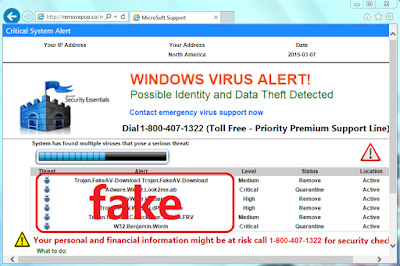
Fake Virus Alert by Removepop.co Removal Help - Stop Annoying Pop-up from IE/ Chrome / Firefox

Windows Virus Alert? Bogus Message!


An IE user's report:

"When I open my browser, a page of removepop.co domain comes. It looks like a virus detecting report, describing that my computer is badly infected. I can't close this pop-up. It seems quite serious, should I call the given number 1-800-407-1322 for help?"


You should know removepop.co pop-up is offered by an adware. It is a fake message. If you call the offered number, you will be required to pay for the so-called tech support sooner or later. The listed virus on this page does not exist in your computer. What you should worry about is the adware which is delivering annoying pop-up.


The adware comes from freeware. When you install some unreliable freeware, they will modify your browsers' setting, then your browser is hijacked by malicious page like removepop.co. Ironically this site sends pop-up instead of removing. You should try to get rid of it completely, otherwise it will come again and again.


6/19/2015

I-computersupport.com Pop-up: A Typical Fake Security Alert

See Through i-computersupport.com pop-up scam

If you open your browser and find i-computersupport.com warning page comes instead of your default homepage, your browser is unfortunately infected with an adware.


This page and its pop-up say that there are horrible computer problems detected, you are requied to call 1-866-921-3145 for help to fix them.
You should not believe a word.his alert is a fake message sent by an adware. The adware aims to pop up similar fake alerts to lead the victims to call the given number. If victimes feel panic and call the given number, they will be required to pay for the so-called tech support sooner or later, or they will get expensive telephone bills. Remember that I-computersupport.com domain page is never a computer support page. This is a common trick targets to inexperienced users. 
Your browser may get infected with it after visiting malicious sites, or it can be hidden in freeware installations and installed by users mistakenly.What you should do is to stop i-computersupport.com pop-up from disturbing you permanently.

6/15/2015

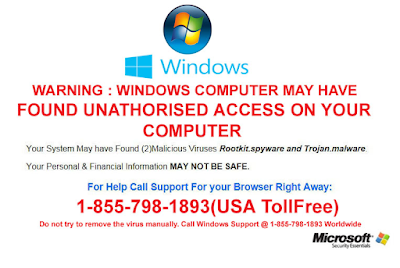
See Through Howareyoucomputer.com - Annoying Fake Security Alert Removal Help

From A Victim:


“When I try to open my browser as usual, a page of howareyoucomputer.com pops up. It looks like a window systerm alert, saying "Windows Computer may have found unathorised access on your computer. Call 1-855-798-1893 for support". I began to worry about my PC's security. It this tech support reliable?"


About howareyoucomputer.com


You should notice that this security alert of howareyoucomputer.com is a fake message. This message is sent by an adware.Your browser may get infected with it after visiting malicious sites, or it can be hidden in freeware installations and installed by users mistakenly. In either way, the adware begins to pop up similar fake alerts to lead the victims to call the given number. If you feel panic and call the given number, you will be required to pay for the so-called tech support sooner or later. Or you will suffer great loss with telephone bills.This is a common trick targeted inexperienced users. What you should do is to stop howareyoucomputer.com pop-up from disturbing you permanently.

You can try the free scanner to know about the real security condition of your computer.  

6/10/2015

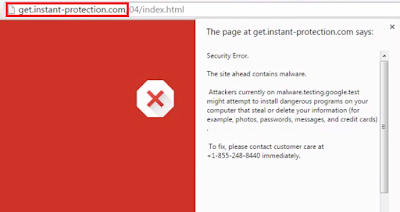
Do Not Believe in instant-protection.com Pop-up - Stop Fake Security Alerts From Firefox, Chrome and IE

A Victim's Description


“When I try to open a news page as usual, a page of instant-protection.com pops up suddenly. It says "The site ahead contains malware, you are advised to call 1-855-248-8440 to fix the threats". I begin to worry about my personal financial information, and use a scanner to check my computer. But it seems nothing wrong in the scan results. I got confused. But the pop-up came again and again. What’s the problem, should I called the offered number?”

Know about instant-protection.com

Users should notice that this security alert of instant-protection.com is not real. This message is supported by an adware in your computer.Your browser may get infected with it after visiting malicious sites, or it can be hidden in freeware installations and installed by users mistakenly.


This is a common trick targeted inexperienced users. If you feel panic and call the given number, you will be required to pay for the so-called tech support sooner or later. What you should do is to stop instant-protection.com pop-up from disturbing you permanently.

You can try the free scanner to know about the real security condition of your computer.  

6/03/2015

Pop-ups of installey.in Removal Help - Eliminate Malicious Pop up Ads on IE/ Chrome / Firefox

Victim Description


“When I was browsing my favorite sites as usual, a page pops up suddenly. It says that my computer is infected with virus, and suggest me to call 1-8666-777-6120 for help. I begin to worry about my personal financial information, and use a scanner to check my computer. But it seems nothing wrong in the scan results. I got confused. Then I open my browser to go on searching, the pop-up came again. What’s the problem, should I called the offered number?”

Know about installey.in


Users should notice that this security alert is not real. This message is supported by an adware in your computer, your browser may get infected with it by visiting malicious sites, or it can be hidden in freeware installations and installed by users mistakenly. If you feel panic and call the offered number, you will be required to pay for the so-called tech-support sooner or later. What you should do is to stop installey.in pop-up from disturbing you permanently.

You can try the free scanner to know about the real security condition of your computer.