6/09/2015

How to Solve Windows Defender Error Code 0x80004004 Problem? - Completely Get Rid of This Problem With Simple Solutions

"Recently I found whenever I click the update button, the update for virus and spyware definition failed. It says "check your internet or network connection and try again". But in fact, I have good internet connection. The detailed information reveals "error code 0x80004004". The Action Center also shows two red area and says "Windows Defender is turned off". The Windows Update seems still working automatically, and Windows Defender can be automatically started."

If you encounter Windows Defender Error Code 0x80004004 problem, your PC may have been infected with viruses or your antivirus is conflict with Window Defender. To solve this problem, you are suggested to reinstall your antivirus or choose a reputable or legal antivirus that can be compatible with Windows Defender. If your PC is infected with viruses. For sake of bypass the detections and blocking, viruses usually disable your antivirus or Windows Defender. In this case, you are recommended to adopt effective removal guides to get rid of viruses completely from your PC. You can use our manual removal tips or automatic method with SpyHunter to remove the viruses.

If You Have Windows Defender Error Code 0x80004004 Problem, What Will Your PC Be?


Your PC may become sluggish and vulnerable.

Your PC may become more and more slowly.

Sometimes, your computer screen freeze up to death.

Remove Deals Cabin Ads From Chrome/ Firefox/ IE With Simple Steps - Deals Cabin Adware Removal Solutions

"Each time I open a web browser installed on my computer, constant pop-up ads from Deals Cabin flood into the webpage I am visiting. These pop-up ads are really annoying and drive me crazy. I ever tried to remove it from my PC, but the adware is still there. Do not know how to remove. Please help...... "

In recent days, many computer users complained about random pop-up ads powered by this adware. We can imagine that this adware is really a potentially harmful program which causes much trouble to our computer users. Therefore, if your computer is infected with Deals Cabin and you get annoyed its ads, you need to take actions to remove it from your computer as early as you can. Keep reading this post to know more about this adware and protect your PC from the latest adware program better.

6/08/2015

Instructions on Removing Trojan.ChangeDNS!html From Computer System Effectively - Trojan.ChangeDNS!html Removal Guide

What is Trojan.ChangeDNS!html?


Trojan.ChangeDNS!html is considered as a malicious trojan virus which aims to play all kind of vicious activities on the target worldwide computers to mess up the whole computer system without any consent. Once installed on the target computer, it will open a backdoor on the infected device, which may introduce other malicious computer threats onto your PC without any permission like adware, rookits, worms, and malware. Then, the victims of this trojan virus may encounter many other computer problems such as slow running speed, unstable Internet connection, system stuck, crashing, blue screen, etc. Therefore, once you find it on your computer, you are suggested to remove Trojan.ChangeDNS!html from the computer system as soon as possible to safeguard your system from further damage.

Guide to Remove Yoursearching.com From Chrome/ Firefox/ IE - Useful Help for Yoursearching.com Browser Hijacker Removal

Each time you open a web browser installed in your computer, you are suddenly redirected to Yoursearching.com. What is it? Should I remove it? How to get rid of its redirects completely? Read this post to know more about this website and properly protect your  PC better.

What is Yoursearching.com?


A Screenshot of  Yoursearching.com:

Yoursearching.com belongs to the category of browser hijacker. It is able to alter your browser settings silently, such as Chrome, Firefox, IE, etc. Usually, this browser hijacker comes into your computer system along with free software especially those from unsafe sources. Therefore, you should download and install freeware online carefully. Once it manages to penetrate into your PC, it will attach itself to your web browsers as an ad-supported toolbar, extension or add-on automatically. Computer attacked by such a browser hijacker will suffer from many computer problems.
  1. The random changes to registry editors will result in many other corrupted Windows registry keys. Thus, this browser hijacker can automatically re-execute each operating system startup. 
  2. Fake computer scan will constantly pop up a message that your PC faces some computer threats. 
  3. Such a browser hijacker may steal your personal confidential information to the remote hackers, like your online login information, banking records, credit cards, IP address and many other online information. 
  4. Web browsers becomes vulnerable. As a result, more and more computer threats come into the infected machine along with this browser hijacker. 
  5. You will often be redirected to other unknown websites all of a sudden when you are visiting or searching something in a website. 
  6. Numerous ads will flood into your PC constantly.

Help to Remove Firewallxalert.com Pop-ups From Chrome/ Firefox/ IE - Firewallxalert.com Fake Alert Pop-ups Removal Instructions

What is Firewallxalert.com?


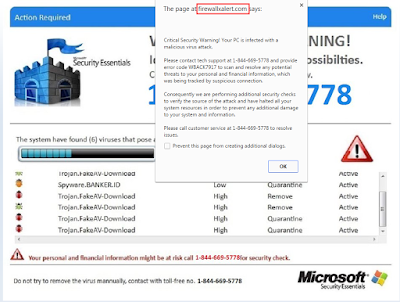
Firewallxalert.com is considered as a malicious scam website which always display fake critical security warning pop-ups within the websites you are visiting. These pop-ups claim that your PC is infected with a malicious virus attack and you need to call tech support at 1-844-669-5778 to resolve this problem. However, you should not trust it because usually such pop-ups are generated by an adware or a potentially unwanted programs (PUP). You always receive such virus alert pop-ups from this domain because that you got adware infection on your computer. Therefore, you should not trust such pop-ups from Firewallxalert.com generated by a nasty adware and not call the phone promoted on this pop-up window because it is just a deception linked to tech support scam. If you do as the pop-up says, then you will not get any useful help but introduce many other computer threats to your PC unwittingly. And what you need to do instantly is that you should use a reputable and powerful anti-spyware application you trust most like SpyHunter to scan and detect your PC thoroughly for possible adware or PUPs hiding in your computer system.

Remove ArcadeTwist Ads From Chrome/ Firefox/ IE Completely - Effectively Remove ArcadeTwist With Simple Steps

Many computer users complained that when surfing online, they are hit by many new tabs with ads, pop-up advertising boxes, random text underlined and planted with hyperlinks from ArcadeTwist. What is it? Is it dangerous? How to remove it? Read this post to know more about it and safeguard your PC from the latest computer viruses better.

Details on ArcadeTwist:


ArcadeTwist is promoted as a useful tool which claims to enhance your browsing experience on arcadetwist.com. However, you should not be fooled by its words. As a matter of fact, it is just an adware which usually comes into users' computer system along with freeware especially those from unsafe sources. Adware developers often bundle their adware programs with freeware installation. Therefore, to safeguard your PC from adware or other potentially unwanted programs, you are suggested to pay much attention to freeware download and installation online.

What is more, ArcadeTwist is an ad-supported program designed by cyber criminals to promote their services or products online illegally. They utilize this ad-supported platform to deliver numerous pop-up ads, banner ads and many other similar things within users' web browsers without any approval. Needless to say, their aim is to make great profits by pay-per-click.

What is worse, to get more clicks, this adware is given the ability to record users' browsing histories and collect their personal online information so as to generate more personalized ads to draw your attention and get more clicks. However, most of time those so-called personalized ads are not related to your need and interests. Moreover, each click on ads by this adware may mean a risk of visiting a suspicious website linked to third parties. If you click on them, you may get nothing useful but introduce many other computer threats which may mess up your computer system. Therefore, you should not click on ads powered by ArcadeTwist no matter how attractive and useful they look like.

A Screenshot of ArcadeTwist Ads:

Remove search.mymapsxp.com Hijacker Effectively - Get Rid of Browser Hijacker Step by Step

About search.mymapsxp.com


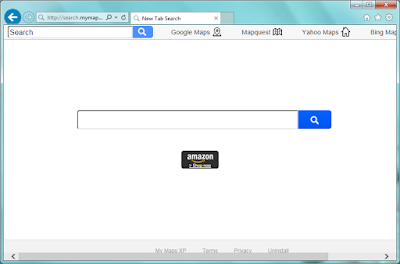
search.mymapsxp.com is a browser hijacker. Do not underestimate it for its simple design. It will redirect users to unwanted sites. It is usually found on common browsers like Internet Explorer, Google Chrome or Mozilla Firefox. Your browser probably got it by visit malicious pages on hacked sites, or it can be hidden in third party installations.


When your browser is hijacked by search.mymapsxp.com:
  • Your homepage and search engine are modified to search.mymapsxp.com, browser setting doesn’t work.
  • Search results are limited, users see sponsored links and irrelevant ads instead of useful information.
  • Browser works slowly, it takes much time to open a new page.
  • Due to the suspicious ads and links, more and more unwanted programs are brought without your knowledge.


Typical browser hijackers like search.mymapsxp.com will not offer you convenient searching experience. You are forced to see numerous ads of sponsored products with its fake search engine. The developers of it profits form the increased web traffic, and your search habits may be collected and made used of for commercial purpose. It is quite necessary to remove this hijacker as quickly as you can.