Showing posts with label remove ransomware. Show all posts

12/20/2015

XRTN Ransomware Removal Instruction Step by Step

What is XRTN Ransomware?


XRTN Ransomware is a computer threat, which is quite annoying and harmful. Its main mission is to lock users' important files and get them to pay a fee for restoring. The encrypted files will be added an extension .xrtn and users can't open or use them no matter how they try. Then the ransomware will send users a message like this:
ATTENTION

All important files and information on this computer (documents,database,etc) will be decrypted using a RSA cryptographic algorithm

Without special software decoding a single file with the help of the most powerful computers will take about a 20 years.

Contact an expert on email:

Obviously this is an extremely malicious threat. It is needed to point out that you should NEVER do as it says to pay the ransom, there is not guarantee that your files will be back. Any trying to pay online can be risky because your banking information can also be stolen and lead to further loss. The only right thing to do is to remove the ransomware immediately.

8/24/2015

How to Remove RSA-2048 Ransomware? - Deal with “Your files are encrypted” Virus

What is RSA-2048 Ransomware?


RSA-2048 is a malicious ransomware, it can encrypt users' files and demand them to pay a ransom.


Victims may see such a pop-up note as soon as they reboot the infected computer. At the same time, files in the computer like .doc, .pdf, .rar, .jpg, .ppt, .xls, .mp3 are all locked and you can't open them any more. The note says you need to pay bitcoins online to get your files back in time, otherwise they will be destroyed forever.

It offers some URLs and other ways for you to pay the ransom. However, computer experts suggest that you should never try to pay. There is no guarantee that you can get the encrypted files back after paying. If you try to pay online, the cyber criminals will probably steal your banking information and you will suffer further loss more than the lost documents.

Unfortunately there is basically no way to get the encrypted files back without paying the ransom. If the files are quite important, you can try to recover them with Shadow Explorer, perhaps some of the files can be rescued. Eliminating the virus is always the first thing you should consider about.

5/25/2015

Help to Remove Locker v1.20 Ransom Virus Effectively - Locker v1.20 Ransomware Removal Solutions


"All your personal files on this computer are locked and encrypted by Locker v1.20. The encrypting has been done by professional software and your files such as: photos, videos, and cryptocurrency wallets are not damaged but just not readable for now. You can find the complete list with all your encrypted files in the files tab.

The encrypted files can only be unlocked by a unique 2048-bit RSA private key that is safely stored on our server till 28/05/2015 00:04:22. If the key is not obtained before that moment it will be destroyed and you will not be able to open your files ever again.

Obtaining your private unique key is easy and can be done clicking on the payment tab and pay a small amount of 0.1 BTC to the wallet address that was created for you. If the payment is confirmed the decryption key will be sent to your computer and the Locker software will automatically start the decrypting process. We have absolutely no interest in keeping your files encrypted forever.

You can still safely use your computer, no new files will be encrypted and no malware will be installed. When the files are encrypted Locker v1.20 will automatically uninstall itself."

When you see such a pop-up window, then your computer is infected with Locker v1.20. In recent days, Locker ransomware seems to have become more and more rampant. And what is more alarming is that there are many active variants of Locker including Locker v3.30, Locker v5.52, Locker v1.7, Locker v1.20, Locker v4.55, v4.81 and Locker v2.60. Anyway, whatever version you got infected, it is the same ransomware. Do not know how to remove locker ransomware variants like Locker v1.20, you are welcomed to read this post to get effective removal support.

5/13/2015

Los Pollos Hermanos Ransomware? - How to Remove ? (Useful Removal Instructions)


What is Los Pollos Hermanos Ransomware?


Los Pollos Hermanos is a newly released malicious ransomware which has the ability to encrypt users' files stored on the computer. It is reported that this ransomware comes into the computer system via a malicious .zip archive. And users should keep in mind that do not open files from strangers easily because once executed, the file will introduce Los Pollos Hermanos to your computer system. Once this dangerous ransomware manages to penetrate into the computer system, it will encrypt users' personal images, videos, documents, and many other similar things. Its targeted files stored in the computer include .doc, .raw, .pdf, .rar, .csv, .jpg, .ppt, .ppsx, .xls, .ods, .crt, .msi, .mp3, .ods, .psd, and more. Once this ransom virus manages to infiltrate into a targeted computer, it will look for these kinds of files and encrypt them very soon. Then, it will display a pop-up message to tell users that their files have been encrypted and they should pay a ransom to decrypt them.

5/04/2015

Help to Remove Alpha Crypt From Your PC Effectively - Useful Guide for Ransomware Removal


What is  Alpha Crypt?


Alpha Crypt, a new type of ransomware, is adept at screen locker technique. It is a kind of malware utilized by Internet frauds to extort money from computer users. This ransom virus has the ability to encrypt users' files on the computer including documents, photos and other similar data, music files. Once it sneaks into a computer via a variety of vicious ways, it will look for these kinds of target files and lock them very soon, then a window pops up to tell you that your files have been encrypted and you need to pay a ransom to open the encrypted files again. As you see such a pop-up window, you may think it is unbelievable and try to open your files on the computer. However, you will feel disappointed because you cannot get access to these files. In this case, some victims of this ransom virus may pay a ransom to the bad guys who design this ransomware. However, there is no guarantee that you will get a real key to decrypt your files after a ransom payment. So, it is highly recommended that you should not pay a ransom to those bad guys. And what you need to do immediately is that you should take actions to remove this ransomware as early as you can to safeguard your PC from further damage. Besides, you should make a backup for the important files regularly.

4/30/2015

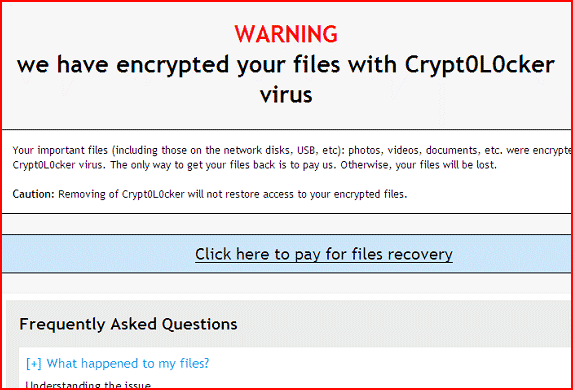
Guide to Remove Crypt0L0cker From Computer Effectively - Useful Instructions for Ransomware Removal


What is  Crypt0L0cker?


Crypt0L0cker, a new type of ransomware, is adept at screen locker technique. It is a kind of malware utilized by Internet frauds to extort money. This ransom virus has the ability to encrypt users' files on the computer including documents, photos and other similar data, music files. Once it sneaks into a computer via a variety of vicious ways, it will look for these kinds of target files and lock them very soon, then a window pops up to tell you that your files have been encrypted and you need to pay a ransom from $300 to $500 to get a code for opening the encrypted files again. As you see such a pop-up window, you may think it is unbelievable and try to open your files on the computer. However, you will feel disappointed because you cannot get access to these files. In this case, some victims of this ransom virus may pay a ransom to the bad guys who design this ransomware. However, there is no guarantee that you will get a real code to decrypt your files after a ransom payment. So, it is highly recommended that you should not pay a ransom to those bad guys. And what you need to do immediately is that you should take actions to remove this ransomware as early as you can to safeguard your PC from further damage. Besides, you should make a backup for the important files regularly.

3/24/2015

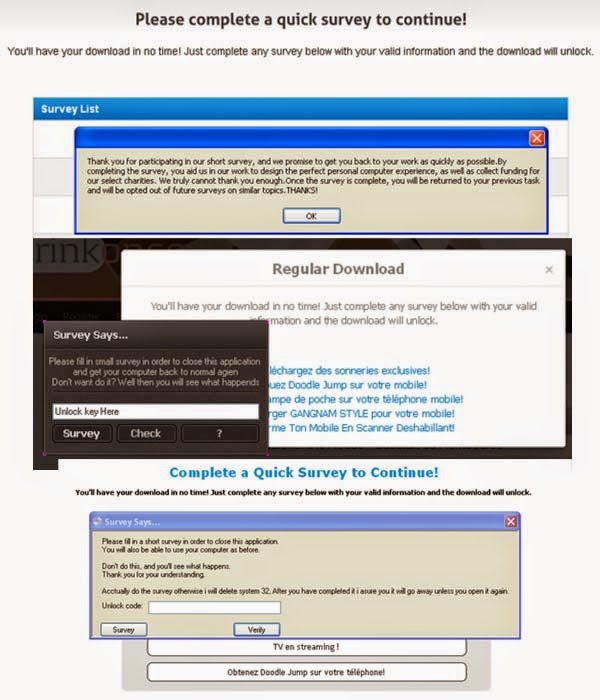
How to Remove 'Please complete a quick survey to continue' Effectively - Get Rid of 'Please complete a quick survey to continue' Step by Step

The Description of 'Please complete a quick survey to continue' Virus:


The 'Please complete a quick survey to continue', deemed as a ransomware, has the ability to lock down the computer users’ desktop, and then it will forces the users to complete a online survey to get access to their computer again. Once the victims do as it says, then the 'Please complete a quick survey to continue' will achieve its goal that it can get access to the infected PC.

3/19/2015

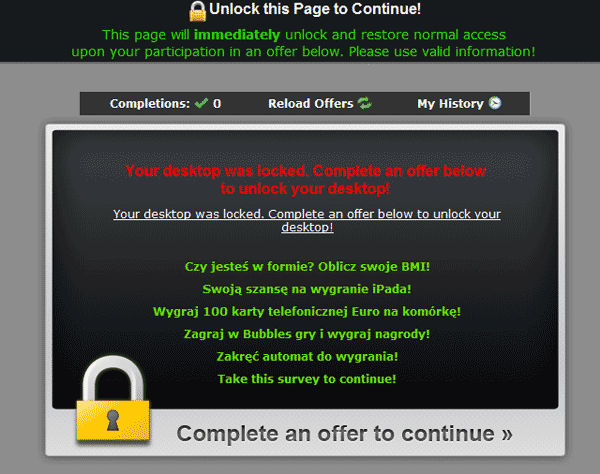
Help to Remove “Unlock this Page to Continue!” Virus with Two Effective Methods - How to Uninstall “Unlock this Page to Continue!” Totally?

The Description of “Unlock this Page to Continue!”Virus:


The “Unlock this Page to Continue!”, deemed as a ransomware, has the ability to lock down the computer users’ desktop, and then it will forces the users to complete a online survey to get access to their computer again. Once the victims do as it says, then the “Unlock this Page to Continue!” will achieve its goal that it can get access to the infected PC.


2/03/2015

Crazy Crypto Wall 3.0 Ransomware - How to Remove Crypto Wall 3.0 from Your PC?

What is Crypto Wall 3.0?


Crypto Wall is a ransomware that encrypts the data of different files types stored in your computer and holds them to make money. CryptoWall 3.0 is a new version of CryptoWall that is able to encrypt your files and then asks you to pay the ransom to get back your files via Tor and I2P anonymous networks.

12/10/2014

How to Remove KeyHolder(Key Holder) Ransomware - Removal of KeyHolder Ransomware Virus


How KeyHolder(Key Holder)Ransomware Get Into Your PC?


As we can know that, the KeyHolder(Key Holder) or other ransomare virus can sneak into the system quietly. Sometimes, users may get a "recommended download" pop up that urges them to download who knows what, and if they click the download button, can get the chance to load on your computer. In addition, KeyHolder(Key Holder) ransomware virus can be bundled with other freeware or shareware, if you download any unknown program from the internet, KeyHolder(Key Holder) can also appear.

12/05/2014

http:// paytordmbdekmizq.tanktor.com/1ptz0Qa Removal, How to Get Rid of http:// paytordmbdekmizq.tanktor.com/1ptz0Qa


This http:// paytordmbdekmizq.tanktor.com/1ptz0Qa sucker is nasty


http:// paytordmbdekmizq.tanktor.com/1ptz0Qa is an unsafe website that has connected with some infamous ransowmare virus which are created to lock down the target computers.

11/23/2014

How to Remove Reverton Ransomware Virus - Reveton Ransomware Upgraded to Steal Passwords Removal


How Do You Know Reverton Ransomware?


Reverton is kind of ransomware virus that is created by LockScreen-only version to a powerful password and credentials stealer by adding the last version of "Pony Stealer". By using this method, it will do deep reverse engineering work which results in almost every password decrypted to plain text form. The malware can crack or decrypt quite complex passwords stored in various forms. It is designed to falsely warns users they’ve broken the law and demands payment of a fine, has been upgraded with powerful password stealing functions.

10/30/2014

Torlocker Has Encrypted Files - How to Remove Torlocker Ransomware Completely


Your computer has been infected with a malware or other infections which has encrypted your files on your computers? You are asked to pay $300 in BitCoins before 9 days or all your files will be encrypted forever? When you checked your files, you can see the encrypted files called TorLocker? Don’t know how to get back your files and remove TorLocker from your computer? Please read this post carefully, and then you will find a solution to fix your issue.

10/16/2014

Encrypt with CryptoWall 2.0 - How to Remove CryptoWall 2.0 Ransomware


Got hit with Cryptowall 2.0 yesterday, all of the Files on my computer have been encrypted, want to find recovery tool to get back my data? Hope someone will help. Cryptowall 2.0 this new version ransomware has attacked many computer users recently. If you want to see more about information on this ransomware, please read the following page.


Cryptowall 2.0: The next generation of ransomware


You may know that an infamous and nasty encrypting infection called Cryptowall which has been a huge threat for computer users in the last days. Now it will give you more damages, for it has released a version called Cryptowall 2.0( Crypto Wall 2.0) or Cryptowall 2; which will encrypt all local data and data found on network shares. It is a new version world’s most widespread ransomware CryptoWall has migrated to the TOR network.

9/15/2014

How to Remove Department of Justice Virus – Unlock Department of Justice Ransomware

Dysfunction Triggered by Department of Justice Virus


Department of Justice Virus also called DOJ virus which has intimate relationship that can function in all the Windows operation system, which may be able to be Window 7, Windows 8, Windows XP, or vista. Once installed, it starts to lock down the target system and block you access the desktop screen. Each time you launch your PC, you cannot get accessed the internet and desktop. Even you run in safe mode with networking, the locked screen show up immediately.In the page, you are asked to certain ransom fine $300 to unlock your system.

9/04/2014

New file-encrypting Ransomware called CryptoGraphic Locker? How to Remove Cryptographic Locker and Restore Your Files

Your files have been encrypted by Cryptographic Locker? You cannot get your files back even though try many hours working on this problem? If you are confusion, please see more about this page.

Cryptographic Locker employs some innovative techniques


Cryptographic Locker is a newly ransomware that infiltrates the computer by means of third-party program. This kind of software was made to generate revenue for its creators. It can use components of CryptoLocker and CryptoWall to sneak into the target computers. Besides, it will add some special codes onto the some freeware or shareware from famous download sites, forums. So you have to be more careful when you want to install something free from the internet or browse some sites online.

8/07/2014

Hacked by SynoLocker Ransomware - Protecting your Synology NAS from SynoLocker Malware

This post attempts to give you a direction for removing recent ransomware called “SynoLocker” which is currently affecting certain Synology NAS servers. Read more the following paragraph, you will get more details about SynoLocker ransomware.

Data in Synology NAS are Encrypted by SynoLocker? SynoLockeR Ransomware Demands Bitcoins


Recently, many computers may have heard about a group ramsomware called SynoLocker has attacked a network-attached storage devices made by Synology. Some users’ data on Synology NAS has been hacked b y this newly ransowmare and most of the data are encrypted.

8/06/2014

Browser Ransomware Keeps Redirecting You to Fraudulent Site: http:/ /law-enforcement-tqvrlbqb.in/ [...] – How to Remove

A newly browser ransomware has attacked many computer users from all over the world in 24 hours. The victim of this ransomware are keeping redirecting to a fraudulent site with the URL: http:/ /law-enforcement-tqvrlbqb.in/ [...]. Now this passage is written for providing an effective way to get rid of this browser bug completely.

Browser Ransomware http:/ /law-enforcement-tqvrlbqb.in/ [...] is Getting Ridiculous


http:/ /law-enforcement-tqvrlbqb.in/ [...] is a very newest browser ransomware that seems affects some computer users. This infection occurs whenever users try to open their all the most common used browsers like Mozilla Firefox, Google Chrome and Internet Explorer. Once got infected this bug, it keeps redirecting the victims to a fraudulent website as follows:
(http:/ /law-enforcement-tqvrlbqb(DOT)in/ [...])
http://law-enforcement-tqvrlbqb.in/js?t=53616c7465645f5fe2b586d3b18216ed9cb53444b66843843b1100bddcff29fd4890c41d5466c564a02272e96f1fefeccf3f78787e696e54&subid=3