Showing posts with label get rid of encryption. Show all posts

5/25/2015

Help to Remove Locker v1.20 Ransom Virus Effectively - Locker v1.20 Ransomware Removal Solutions


"All your personal files on this computer are locked and encrypted by Locker v1.20. The encrypting has been done by professional software and your files such as: photos, videos, and cryptocurrency wallets are not damaged but just not readable for now. You can find the complete list with all your encrypted files in the files tab.

The encrypted files can only be unlocked by a unique 2048-bit RSA private key that is safely stored on our server till 28/05/2015 00:04:22. If the key is not obtained before that moment it will be destroyed and you will not be able to open your files ever again.

Obtaining your private unique key is easy and can be done clicking on the payment tab and pay a small amount of 0.1 BTC to the wallet address that was created for you. If the payment is confirmed the decryption key will be sent to your computer and the Locker software will automatically start the decrypting process. We have absolutely no interest in keeping your files encrypted forever.

You can still safely use your computer, no new files will be encrypted and no malware will be installed. When the files are encrypted Locker v1.20 will automatically uninstall itself."

When you see such a pop-up window, then your computer is infected with Locker v1.20. In recent days, Locker ransomware seems to have become more and more rampant. And what is more alarming is that there are many active variants of Locker including Locker v3.30, Locker v5.52, Locker v1.7, Locker v1.20, Locker v4.55, v4.81 and Locker v2.60. Anyway, whatever version you got infected, it is the same ransomware. Do not know how to remove locker ransomware variants like Locker v1.20, you are welcomed to read this post to get effective removal support.

5/13/2015

Los Pollos Hermanos Ransomware? - How to Remove ? (Useful Removal Instructions)


What is Los Pollos Hermanos Ransomware?


Los Pollos Hermanos is a newly released malicious ransomware which has the ability to encrypt users' files stored on the computer. It is reported that this ransomware comes into the computer system via a malicious .zip archive. And users should keep in mind that do not open files from strangers easily because once executed, the file will introduce Los Pollos Hermanos to your computer system. Once this dangerous ransomware manages to penetrate into the computer system, it will encrypt users' personal images, videos, documents, and many other similar things. Its targeted files stored in the computer include .doc, .raw, .pdf, .rar, .csv, .jpg, .ppt, .ppsx, .xls, .ods, .crt, .msi, .mp3, .ods, .psd, and more. Once this ransom virus manages to infiltrate into a targeted computer, it will look for these kinds of files and encrypt them very soon. Then, it will display a pop-up message to tell users that their files have been encrypted and they should pay a ransom to decrypt them.

3/05/2015

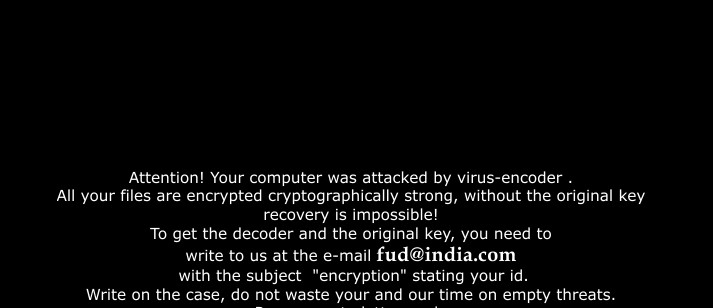
Guide to Remove Fud@india.com Ransom Virus Effectively - How to Remove Fud@india.com Ransom Virus Completely From Your PC?

In recent days, some people complain about _Fud@india.com which has encrypted all their important files. What is Fud@india.com? How to remove it from the computer? This post gives you more information about it, and you may get some help to get rid of the ransom virus from the post.