Showing posts with label remove browser pop-up. Show all posts

2/23/2016

How to Remove 895-system 32.exe Pop-up on Pcsystemfailed.com

Know about Pcsystemfailed.com pop-up


Pcsystemfailed.com page comes with a stubborn pop-up page. It offers some error codes that you may know nothing about them, however there is one thing it states clearly: Your computer is suffering horrible errors and you are suggested to contact 8667403222 to fix the them.


You need to keep a clear head. This page is offering false information. It tells you so to promote its removal tools and services by chance. The co-called errors do not exist, the only reason you see this pop-up is because there are malicious plugins or malware on your computer. You probably get them when you install third party freeware, or malware and viruses are responsible for them. If you want to stop the annoying pop-up permanently, you need to remove all the threats in your PC.

1/26/2016

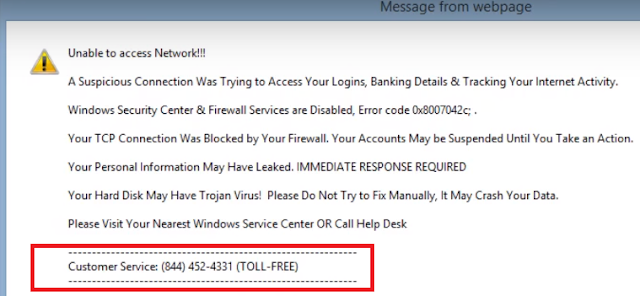
Fake 'Customer Service' Number (844)452-4331 - How to Remove This Stubborn Pop-up

Have you seen 40045003.info domain pop-up?


About 40045003.info Pop-up


Be careful, even though 40045003.info page looks like a system security alert, you should know that this pop-up is a malicious ad send by the adware in your computer. Those who call the given number 8444524331 will finally be asked to purchase some removal tools or services.
However the truth is, the so-called security error 0x8007042c do not exist in their PC, you don't need to contact any technician or pay for unnecessary services.
You probably got the adware when you installed some other freeware or shareware. The browsers settings and registry data can be modified without your consent. That' why such a pop-up keeps coming to bother your browsing again and again. To get rid of the related threats completely, you need to remove those unwanted plugins and programs permanently.

12/28/2015

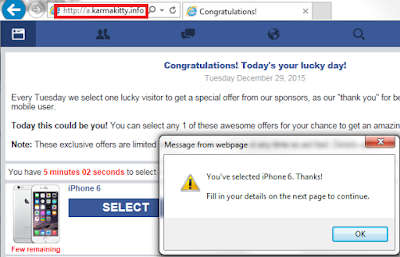
See Through "Win An iPhone" Scam on A.karmakitty.info - Eliminate Fake Reward Pop-up

Victim report:

"Today when I was trying to open my IE a page came instead of my Google homepage. It said that I ways the lucky visitor to win an iPhone 6 and require my details. I thought it dubious so I shut the page. While next time the same pop-up come again. What should I do?"

12/14/2015

Remove Spurious "Blue Screen Error 0X000000CE" Pop-up

Know about zgvzy3jpchrpb24.website


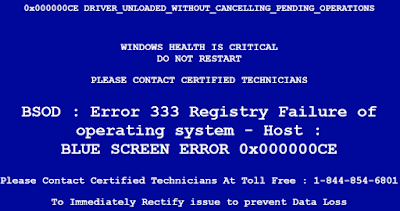
zgvzy3jpchrpb24.website is designed to be like a BSOD message, for the blue background and the complicated error codes like "BSOD : Error 333 Registry Failure". Users can be scared to believe there are horrible problems in their computer, then call the number 1-844-854-6801 given on the page. However you should not be fooled. This page is offering fake information about your computer's security condition, it is just an ad that try to take users in.


The only thing you need to worry about is just the adware infection, which leads to the stubborn pop-ups on your Chrome, Firefox and IE. The adware send such a fake message to promote related programs and services, because the victims will be demanded to charge for them. If you do as the message says, you may suffer financial loss. The related adware can be brought to your computer together with third party freeware. They modify your browsers' settings so that the pop-up ads keep coming as soon as you run your browsers. Viruses like Trojan horses are also responsible for the annoying ad. 

11/05/2015

Zbippirad.info Pop-up - How to Remove It Easily With Efficient Steps

What is zbippirad.info

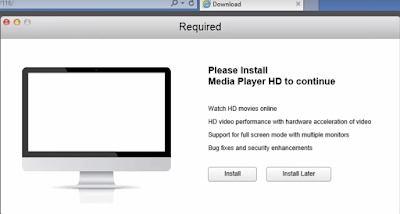
Zbippirad.info is recommending a media player HD to users, but if you click to install its programs blindly, you will get malicious programs even trojans. This message is supported by an adware, it is an ad which is promoting related programs to earn pay-per-download revenue.


You need to distinguish such bogus player recommendation message. Your browser may get infected with it by visiting malicious sites, or it can be hidden in freeware installations and installed by users mistakenly. The pop-up will come again and again if you don't remove the supporting adware. Read this blog to stop it.

11/04/2015

Guide to Remove Myfixrhelpyou.com - Easy Steps to Get Rid of Annoying Fake Message

What is myfixrhelpyou.com pop-up?

Myfixrhelpyou.com domain page is a malicious ad. If you found it appear on your browsers, never try to click any part of this page. You should distinguish such an ad with these symptoms:


  • It has a blue background and white warning words, describing that you had adware or malware and such a pop-up is caused.
  • It has a title of "Virus Warning Alert", and will keep coming as soon as you open your browsers.
  • It offers some complicated error codes, which make it looks like a standard warning page.
  • It provided a dubious number 1-866-453-2895, saying that you can fix the problem by calling it.
You should try to avoid being a victim of this scam. This page is trying to mislead users to use its related services and programs to deal with the non-existing errors. It can also cause serious troubles in some other ways. It may contain trojan horse that sneaks into your computer, waiting for you to purchase online shopping. Then your online banking information will be stolen and lead to financial loss. Anyway, it is necessary to remove the related plugins and stop the pop-up effectively.

11/02/2015

Stop Virus-found.in Pop-up Effectively - Stop Fake BSOD Information from Disturbing You

Know about virus-found.in


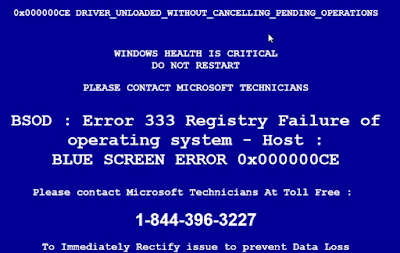
Have you seen such a pop-up? It offers some error codes and tells you that horrible problems happened in your computer. A tech number is given to solve those issues: 1-844-396-3227. You can't be misled by this message, even though it has a dubious domain like virus-found.in . It is just a fake message. You PC can be totally safe, expect this annoying adware which is responsible for such a malicious pop-up.

This fake system alert comes if your browser had been infected with malicious plugins. The modification of your browsers ensure the pop-up come every time you open the browsers. You need to remove the adware and reset your browser permanently.

10/26/2015

Operatingsystemerror.in Pop-up Removal Help - Guide to Remove Annoying Bogus Message

Know about operatingsystemerror.in


Did you see such a pop-up? It says your computer has some horrible problems that you should not restart your PC. A tech number is given to solve those issues: 1-844-396-3227.

You must distinguish this message. It can be from a page of operatingsystemerror.in domain. It is just a fake message. You PC can be totally safe, expect this annoying adware which is responsible for such a malicious pop-up.

This fake system alert comes if your browser had been infected with malicious plugins. The modification of your browsers ensure the pop-up come every time you open the browsers. You need to remove the adware and reset your browser permanently.

10/13/2015

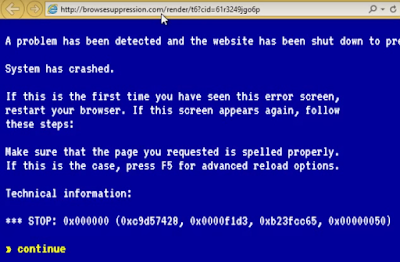
browsesuppression.com Pop-up - How to Deal with Fake System Crash Information

Know about browsesuppression.com pop-up

Browsesuppression.com domain page is a malicious ad. You need to distinguish it by some symptoms:


  • It has a blue background and white warning words, describing that your a problem which causes system crash is detected.
  • It will keep coming as long as you run the infected browsers.
  • It offers some error codes like 0xc9d57428, 0x000f1d3 and 0xb23fcc65.
  • Once you click the "continue" on it, you will be redirected to another page and offered a number, claiming that you can solve the problem by calling the help line.

You should try to avoid being a victim of this scam. This page is trying to mislead users to use its related services and programs to deal with the non-existed errors. It can also cause serious troubles in some other ways. It may contain trojan horse that sneaks into your computer, waiting for you to purchase online shopping. Then your online banking information will be stolen and lead to financial loss. Anyway, it is necessary to remove the related plugins and stop the pop-up effectively.

9/07/2015

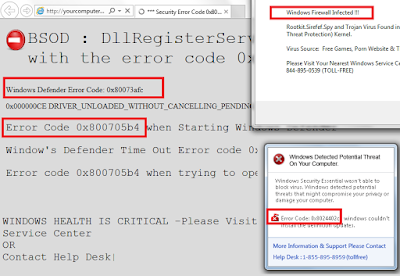
Stop Yourcomputerhelpdesk.com pop-up - "Security Error Code 0x80070424" is a Scam

Know about yourcomputerhelpdesk.com pop-up

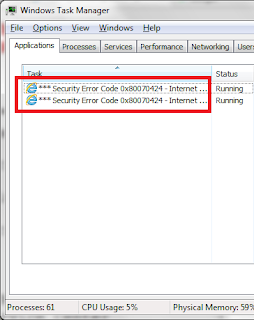
Recently some users receive pop-ups when they are trying to browse normal sites as usual. This pop-up has the title of "Security Error Code 0x80070424 ", they are from a page with the domain name yourcomputerhelpdesk.com. These pop-up can't be shut no matter how you try clicking on it, unless you run the Windows Task Manager to end this process.


This page offers messy information. It list some "error code" like 0x80073afc and 0x800705b4. Users are told to call the offered numbers to get tech support to fix these errors. They can be quite confused and wonder what exactly the problem is and which number to call.


You don't need to be confused or panic. Yourcomputerhelpdesk.com domain page is just a fake waring. It is a kind of malicious ad, which aims to mislead uses to call the given numbers so that it can promote related removal tools or services. What's more, victims who do as it says may get files contain trojans, then their online banking information will be stolen if they try to pay the bills online.

The malicious page can hijack your browsers so that the same pop-up will keep coming to bother you. You probably get it by clicking dubious ads or opening spam mails. What you need to do now is to remove all the related threats in your PC to have a better browsing experience.