Showing posts with label delete pop-ups. Show all posts
Showing posts with label delete pop-ups. Show all posts
6/30/2015
Help to Remove Fake Plugin Activity 2 Pop-up Ads Step-by-step - Useful Pop-up Ads Removal Instructions
Fake Plugin Activity 2 is detected as an adware by several reputable antivirus applications. It is reported that this adware is usually distributed via freewares, sharewares and corrupted websites. The appearance of adware on your computer indicates that your computer is vulnerable and susceptible. Moreover, this adware contains other adware programs, browser hijacker, other unclear objectives like some malicious codes and it is also able to install unwanted extensions, add-ons and toolbars on your web browsers. This adware can play such kinds of vicious actions on your computer without being noticed because it has the ability to execute a series of actions on your computer by modifying your system settings including your browser settings. Then, your computer will get in a big mess.
In this case, simply restarting your computer, removing it from windows, browsers with manual method all seem almost impossible to get rid of this adware completely unless you have rich experience in removing computer viruses. The reason is that this adware has created lots of malicious codes hiding on every corner of your computer and it is difficult for average inexperienced computer user to find and remove them manually. If you cannot remove this adware along with all malicious codes, components associated with it, it will come back to your computer system quickly even just after a manual removal. Therefore, to remove Fake Plugin Activity 2 from your computer completely, you are suggested to use a reputable and powerful antivirus application like SpyHunter to help you scan, detect and remove it thoroughly.

5/27/2015
Effectively Remove Repair.virgiltechsupport.com Pop-ups From Chrome/ Firefox/ IE - Repair.virgiltechsupport.com Removal Support
"I see random pop-ups from Repair.virgiltechsupport.com showing up within my web browsers constantly? Pop-ups tell that there are computer security issues on my PC? Is it fake or true? Should I call for tech support at the phone number promoted on this website? What should I do now?"
A Screenshot of Repair.virgiltechsupport.com:

You know recently pop-ups from malicious domain seem to have been a popular tool used by cyber criminals to promote certain products or services in order to make great profits. Needless to say, Repair.virgiltechsupport.com is also a malicious scam website which claims to offer the computer security help for PC users. You always receive such security alert pop-ups from this domain because that you got adware infection on your computer. The pop-up window claims that there is something wrong with your computer and your computer may not be protected. To fix your computer problems, you should call the phone number (855)-313-8446 promoted on this domain to get their so-called system support immediately.
But you should not trust such pop-ups from Repair.virgiltechsupport.com generated by a nasty adware and not call the phone promoted on this pop-up window because it is just a deception linked to tech support scam. If you do as the pop-up says, then you will not get any useful help but introduce many other computer threats to your PC unwittingly. And what you need to do instantly is that you should use a reputable and powerful anti-spyware application you trust most like SpyHunter to scan and detect your PC thoroughly for possible adware or PUPs hiding in your computer system.
If you also encounter the same problem as this computer user's and you are looking for removal solutions to fix this problem, you are welcomed to keep reading this post.
What is Repair.virgiltechsupport.com?
A Screenshot of Repair.virgiltechsupport.com:
But you should not trust such pop-ups from Repair.virgiltechsupport.com generated by a nasty adware and not call the phone promoted on this pop-up window because it is just a deception linked to tech support scam. If you do as the pop-up says, then you will not get any useful help but introduce many other computer threats to your PC unwittingly. And what you need to do instantly is that you should use a reputable and powerful anti-spyware application you trust most like SpyHunter to scan and detect your PC thoroughly for possible adware or PUPs hiding in your computer system.
2/16/2015
Guide to Remove Cdn.staticwebdom.com - Stop Cdn.staticwebdom.com Effectively
Cdn.staticwebdom.com gives you quite a lot of irritation
Cdn.staticwebdom.com is a kind of misleading website that is connected with a type of adware and hijacker browser. It is very obvious infection for computer users that it starts to show a lot of pop-ups on the screen. Each time you open your browsers, you can get pop-ups from Cdn.staticwebdom.com which can disturb your work on computer.
1/20/2015
Raving Reyven Adware – How to Remove Raving Reyven Adware Completely and Safely
Raving Reyven adware has been found attack many computer users these days recently. But many users cannot deal with this adware with effective means now. This article aims to assist them to remove and get rid of Raving Reyven adware completely in simple guide.
12/31/2014
Storageen.net Pop-ups - How to Get Rid of Storageen.net Pop-ups
Have you get the pop-up page like this:
The page at www.storageen.net says:
1)Windows firewall warning!
YOUR COMPUTER MAY HAVE ADWARE/SPYWARE VIRUS
Call 1-844-373-0538 immediately for asssitance on how to remove potential viruses. The Call is free.
....
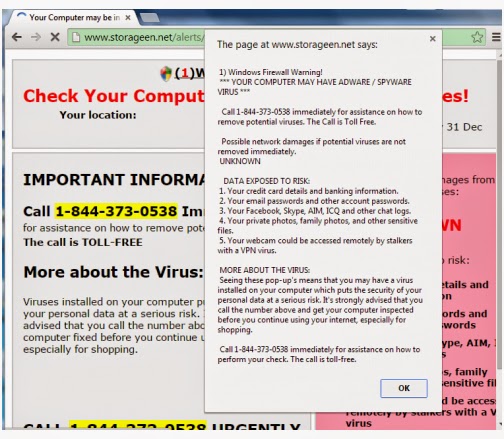
If in case your computer has controlled by Storageen.net pop-up alerts, please read more about the following page.
12/23/2014
How to Remove Crazy Deal (crazydeal), Stop Ads by crazydeal Completely
Computer goes crazy with crazydeal?
The target computers go on getting a bunch of different advertisements as long as they launch their internet browsers to search something online if infected with crazydeal. The ads are filled with all over the screen of webpages, and they would find that there are many sponsor links and malware websites shown on the popping up ads. As many users say, most of ads are related to health and fitness, survey, quiz, and so on, and these ads are made into fetching for being attracting with visitors from all variety of age groups.
How to Remove Redirect.ad-feeds.net - Infected with redirect.ad-feeds.net/impressions/?p=114441
Infected with a nasty little redirect? What redirect.ad-feeds.net is?
By making changes of the default internet browsers and NDS or other system settings, redirect.ad-feeds.net will put your system under the control. This program can attack all kinds of browsers such as Google Chrome, Mozilla Firefox, Microsoft Internet Explorer, Yahoo, or Bing. Some other plug-in, or browser helper object (BHO), in such case, users can see a list of unknown add-ons, short-cuts, icons will aslo be attached on your computer.
12/22/2014
Extutil and Managera Removal - How to Remove Extutil and Managera Extensions
Torrent Pop -Ups From Extutil and Managera
Extutil and Managera are two browser plug-ins or extensions which is able to be attacked onto the internet browser slightly. These extension attack different kinds of browsers include Internet Explorer, Firefox and Google Chrome or any other web browsers.
12/21/2014
Infected with Pixel.cpm2track (pixel.cpm2track.com) – How Do I Remove Pixel.cpm2track.com?
Your computer has been attacked by many pop-up tabs once you open the web browsers, and then you check the processes tab and see internet explorer running random websites such as emls.domads.net, xaxis.com, wineverygame.com, pixel.cpm2track.com. Those sites keep running on your computer’s background. Want to seek an easy way to remove those bugs from your computer? Please keep reading for this post.
Pixel.cpm2track.com or Pixel.cpm2track is a questionable website that triggers many unexpected issues on the target computers. It keeps running on the compromised computers after installing. It will trigger some others sites to run into the infected system such as emls.domads.net, xaxis.com, wineverygame.com, ads.alladserv.com, www.bradenton.com.
Pixel.cpm2track.com runs in the background?
Pixel.cpm2track.com or Pixel.cpm2track is a questionable website that triggers many unexpected issues on the target computers. It keeps running on the compromised computers after installing. It will trigger some others sites to run into the infected system such as emls.domads.net, xaxis.com, wineverygame.com, ads.alladserv.com, www.bradenton.com.
12/10/2014
Easily Remove bvoice5.com (rsbs.bvoice5.com) From Your Computer – Removal of bvoice5.com Step by Step
Are you still wondering if your computer is infected?
I have an annoying little pop up asking me if I want to talk to rsbs bvoice5.com and am wonder if anyone out there has had the problem and what was required to eliminate it. So far it is only annoying but I have a feeling it could do all kinds of nasty things. I am not really computer literate but I do have some understanding.(A quote from victim)
You are confused about that if your system has been infected with rsbs bvoice5.com or bvoice5.com. You might have the same problem like many of victims.
12/03/2014
Super Deals Pop-ups Shown - Best Way to Remove Super Deals Pop-ups
Overwhelmed by Super Deals Pop-ups
Super Deals can be compatible with all using web browsers such as Firefox, Google Chrome, Internet Explorer, Yahoo, or Bing. Once got installed on target computers, it starts to pop up numerous coupons, advertisements, sponsored links to mislead you to be the target of internet sales.
Super Deals is a form of browser extension that can be compatible with all brands of web browsers such as Mozilla Firefox, Internet Explorer, Google Chrome, Bing or Yahoo. It will manipulate and force the mentioned search redirects to some random web sites for advertising purposes. This extension modifies your computer’s settings and displays unsolicited call-the windows.
11/24/2014
Remove Jsl.infostatsvc.com - Completely Delete and Get Rid of Jsl.infostatsvc.com
Are you getting crazy popups from jsl.infostatsvc.com? Your computer slows down after many pop-ups and add-ons have been created? Don’t know how to get rid of it completely? Learn more details below.
Once jsl.infostatsvc.com installed, it starts to make some sorts actions on the installed computers, and then some strange occurrences with this program, you will see more here;
Strange occurrences with Jsl.infostatsvc.com
Once jsl.infostatsvc.com installed, it starts to make some sorts actions on the installed computers, and then some strange occurrences with this program, you will see more here;
11/21/2014
http://gamezdoka.org (gamezdoka.org) Pop-ups and Redirects, How to Remove Gamezdoka.org Pop-ups Completely
Obviously be stuck with http://gamezdoka.org (gamezdoka.org) pop-ups
You might be stuck with gamezdoka.org pop-ups and redirects once installed on your computers, for it can do a lot of unwanted activities on PC. It might attack any browser you have installed on your computer. In the majority of the cases it may become integrated with browsers like Google Chrome, Internet Explorer and Mozilla Firefox.
11/19/2014
Remove Deal Keeper Popup Adware – How to Get Rid of Deal Keeper Popup with Simple Way
Encountered any serious problems with deal keeper popup
Deal Keeper is kind of unwanted program that can get inside the target computer slightly. As long as this program comes out, your computer are easily seen a lot of strange things. First of all, every time you start to open your browsers, you may find a ton of ads or links show on screen. These pop-up windows seem to be very nasty that each time you try your best to close any of them, it will open a new one instead in a few minutes. These pop-ups display on all webpages which can take control of the whole screen. In addition, deal keeper shows pop-up ads can start when you access the network even though you have never opened your browsers.