Continuous Message From Webpage Pop-up Won't Go Away
Each time you are surfing online, Message from Webpage pop-up window appears on your computer continuously. Once you see such a pop-up, you may try to close the pop-up window, but it still won't go away. What is going on? How to fix this problem?
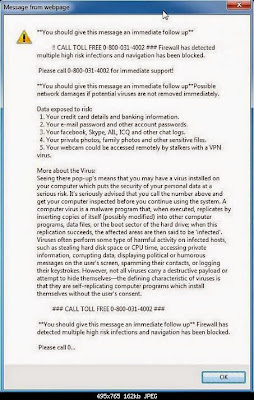
Usually, such random pop-up may be caused by a malicious domain associated with some kind of malware like adware. The message from webpage pop-up window says that your computer firewall has detected multiple high risk infections and navigation has been blocked. And you are suggested to call 0-800-031-4002 for immediate support. However, you should not trust such pop-up message easily because nowadays tech support scam is more and more common. Therefore, it is highly recommended that you should not call 0-800-031-4002 promoted on this pop-up window easily, so as not to be cheated. Therefore, once you see such message from webpage pop-up, what you need to do immediately is to use a reputable and powerful anti-spyware application you trust to scan and detect your computer system thoroughly for possible malware like adware hiding in the system. Then, take actions to remove suspicious programs which are recently installed without your knowledge.
Download free scanner to scan and detect computer system completely for possible malware associated with Message From Webpage Pop-up.

