5/15/2015

Pine Tree Ads Removal Guide - Stop Ads by Pine Tree Completely and Quickly

What is Pine Tree


Pine Tree  is classified as an adware. It advertises itself as a useful extension that improves your browsing experience. It is promoted in popular browsers like Internet Explorer, Mozilla Firefox and Google Chrome. It probably comes to your PC by bundling into other installations, or you may download it for trusting its slogan "Pulling the best deals!"


The links offers by Pine Tree are questionable with security issues, most of them are even malicious sites with poor reputation. If you are attracted and click to these sites, your PC’s safety would be in great danger. Malware will be installed automatically into your PC without your knowledge, they will mess up your system.

How to Remove Win32/TriMore.A From Computer System Completely - Guide to Remove This Trojan Virus Effectively

What is Win32/TriMore.A?


Win32/TriMore.A is a dangerous and harmful Trojan virus. It is created by those bad guys who aim to collect the computer users’ information to play vicious actions, which may be a big threat to the security and privacy. Once installed on the target computer, it will open a backdoor on the infected device, which may introduce other computer threats into the machine. Besides, the computer users may encounter many other computer problems such as slow running speed, unstable Internet connection, crashing, blue screen, etc. All in all, this Trojan virus is very malicious, which can mess up your computer system.

Guide to Remove Ads by QuickSearch 0.0.3 From Chrome/ Firefox/ IE - Useful Removal Instructions for Win 7/ Win 8 Users

What is QuickSearch 0.0.3?


QuickSearch 0.0.3
 is promoted as a useful tool from which you can get better results faster online. However, you should not trust this program because it is not as useful as advertised. And what is amazing is that it is categorized as an adware program or a potentially unwanted program (PUP). If you keep such a potentially troublesome adware on your PC, then you may put your computer as well as personal online information in danger. This adware is able to track users' browsing histories and collect related personal online information so as to deliver related ads to the users according to browsing habits. As you see, no one would keep such an adware program which may put personal privacy in danger on the computer system. Besides, once installed, this adware program will display pop-up ads shown as boxes on any webpage you are visiting. These boxes contain a variety of coupons which are available, pop-up ads, advertising banners or as underlined keywords. These ads aim to promote web browser toolbars, optimization utilities and other products. Then its designer can earn money via generating pay-per-click revenue. What is worse, the installation of this adware on the computer may introduce other high-risk malware or PUPs to the system, which will lead to many other computer problems.

5/14/2015

How to Remove Ads by Bold Letters From Chrome/ Firefox/ IE Effectively - Useful Removal Guide for Win 7/ Win 8 Users

What is Bold Letters?


Bold Letters
 is promoted as a useful tool which claims to help users to enhance online surfing experience including online shopping. However, you should not trust this program because it is not as useful as advertised. And what is amazing is that it is categorized as an adware program or a potentially unwanted program (PUP). If you keep such a potentially troublesome adware on your PC, then you may put your computer as well as personal online information in danger. This adware is able to track users' browsing histories and collect related personal online information so as to deliver related ads to the users according to browsing habits. As you see, no one would keep such an adware program which may put personal privacy in danger on the computer system. Besides, once installed, this adware program will display pop-up ads shown as boxes on any webpage you are visiting. These boxes contain a variety of coupons which are available, pop-up ads, advertising banners or as underlined keywords. These ads aim to promote web browser toolbars, optimization utilities and other products. Then its designer can earn money via generating pay-per-click revenue. What is worse, the installation of this adware on the computer may introduce other high-risk malware or PUPs to the system, which will lead to many other computer problems.

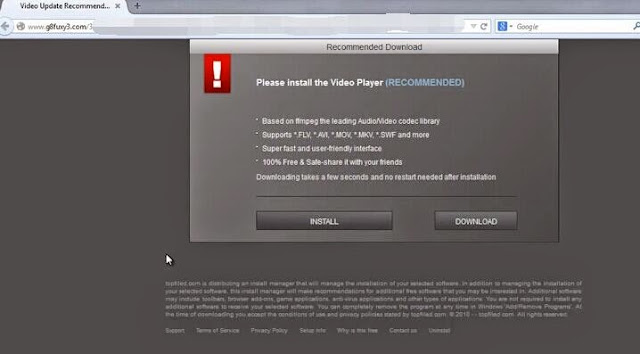
Help to Remove g8fuxy3.com Pop-ups From Chrome/ Firefox/ IE - Useful Removal Instructions for Win 7/ Win 8 Users

What is g8fuxy3.com?


g8fuxy3.com is considered as a malicious domain generated by a nasty adware program or a potentially unwanted program. So, if you see random pop-ups from this domain, then your computer may be currently infected with an adware program or a potentially unwanted program which usually sneaks into the computer system via bundled with a freeware ‘Express’ or ‘Typical’ option. The adware associated with this domain is added to users’ web browsers as a browser extension or a plug-in which enables g8fuxy3.com to pop up in a new tab each time you open a web browser. These pop-ups from this domain says that you can require the latest video player update from this domain. However, you should not trust such pop-ups from this domain because these update popups just aim to induce you into downloading and installing fake updates or potentially harmful software promoted on this domain. If you do as the pop-up says, then you will not receive any useful updates but introduce numerous computer threats to your PC. Therefore, once you see such pop-ups from g8fuxy3.com, you should ignore it and take actions to remove it from your PC as soon as possible.

How to Deal with Poztol.info Pop-ups - Get Rid of Threatens by Malicious Domain

What is Poztol.info

If you see a pop-up like this,DO NOT click to agree.


Poztol.info is a malicious extension, or adware to be more specific. It tries to cheat you to download for generating pay-per-install revenue, and displays ads on infected browser. Mozilla Firefox, Google Chrome and Internet Explorer user should watch out, this adware comes bundled with freeware, or you may get it by visiting the associated sites. This extension suggests you to download some so-called updates, but you never know what exactly you had downloaded. If you are cheated by it over and over, finally you will see that your browser or even your computer a mess. What’s more, it is associated with some phishing sites, if you input your password or banking information on them, you may suffer suffer great loss.

Guide to Remove TrojanDownloader:Win32/Zetdorm.A - Useful Instructions for Trojan Horse Removal

What is TrojanDownloader:Win32/Zetdorm.A?


TrojanDownloader:Win32/Zetdorm.A is a dangerous and harmful Trojan virus. It is created by those bad guys who aim to collect the computer users’ information to play vicious actions, which may be a big threat to the security and privacy. Once installed on the target computer, it will open a backdoor on the infected device, which may introduce other computer threats into the machine. Besides, the computer users may encounter many other computer problems such as slow running speed, unstable Internet connection, crashing, blue screen, etc. All in all, this Trojan virus is very malicious, which can mess up your computer system.