5/18/2015

How to Remove Wkgfrba.com Pop-ups From Chrome/ Firefox/ IE Effectively - Useful Removal Instructions for XP/ Win 7/ Win 8 Users

What is Wkgfrba.com?


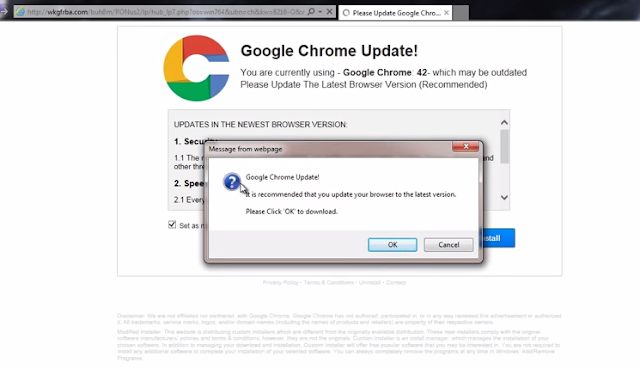
Wkgfrba.com is considered as a malicious domain generated by a nasty adware program or a potentially unwanted program. So, if you see random pop-ups from this domain, then your computer may be currently infected with an adware program or a potentially unwanted program which usually sneaks into the computer system via bundled with a freeware ‘Express’ or ‘Typical’ option. The adware associated with this domain is added to users’ web browsers as a browser extension or a plug-in which enables wkgfrba.com to pop up in a new tab each time you open a web browser. The message from webpage says that there is a google chrome update and you are suggested to update your browser to the latest version. However, you should not trust such pop-ups from this domain because these update popups from this domain just aim to induce you into downloading and installing fake updates or potentially harmful software promoted on this domain. If you do as the pop-up says, then you will not receive any useful updates but introduce numerous computer threats to your PC. Therefore, once you see such pop-ups from wkgfrba.com, you should ignore it and take actions to remove it from your PC as soon as possible.
Remove Desktop Recipe from IE/ Chrome / Firefox - Quickly Get Rid of Adware Step by Step

What is Desktop Recipe


Desktop Recipe is attractive to those who love cooking. It claims to provide convenient searching for recipes. It is promoted in popular browsers like Google Chrome, Internet Explorer, Mozilla Firefox. It probably comes to your PC bundled with third party installations, or you may download it for trusting its slogan "Quickly search for popular recipes from your desktop for Free!"


However it is classified as an adware. Desktop Recipe will keep delivering various advertisements, whether you want to see them or not. You will find that Advertisements with labels like "Ads by Desktop Recipe", “Powered by Desktop Recipe”. The ads aim to generate pay-per-click revenue, your visiting will benefits the ads supporters. You had better not click on the offered ads because they are mostly unreliable. You may mistakenly download many unwanted programs, and they will mess up your computer badly.

How to Remove Safedownloadsrus131.com Pop-ups From Chrome/ Firefox/ IE Effectively - Useful Removal Guide for XP/ Win 7/ Win 8 Users

What is Safedownloadsrus131.com?


Safedownloadsrus131.com is considered as a malicious domain generated by a nasty adware program or a potentially unwanted program. So, if you see random pop-ups from this domain, then your computer may be currently infected with an adware program or a potentially unwanted program which usually sneaks into the computer system via bundled with a freeware ‘Express’ or ‘Typical’ option. The adware associated with this domain is added to users’ web browsers as a browser extension or a plug-in which enables Safedownloadsrus131.com to pop up in a new tab each time you open a web browser. These pop-ups from this domain says that you can require the latest version of Media Player from this domain. However, you should not trust such pop-ups from this domain because these update popups just aim to induce you into downloading and installing fake updates or potentially harmful software promoted on this domain. If you do as the pop-up says, then you will not receive any useful updates but introduce numerous computer threats to your PC. Therefore, once you see such pop-ups from safedownloadsrus131.com, you should ignore it and take actions to remove it from your PC as soon as possible.

How to Remove Infostealer.Fightpos Trojan Virus From Computer System? - Helpful Removal Instructions for Trojan Horse Removal

What is Infostealer.Fightpos?


Infostealer.Fightpos is a dangerous and harmful Trojan virus. It is created by those bad guys who aim to collect the computer users’ information to play vicious actions, which may be a big threat to the security and privacy. Once installed on the target computer, it will open a backdoor on the infected device, which may introduce other computer threats into the machine. Besides, the computer users may encounter many other computer problems such as slow running speed, unstable Internet connection, crashing, blue screen, etc. All in all, this Trojan virus is very malicious, which can mess up your computer system.

5/17/2015

How to Remove Srv.desk-top-app.info Pop-ups From Chrome/ Firefox/ IE Effectively? - Useful Removal Instructions for Win 7/ Win 8 Users

What is Srv.desk-top-app.info?


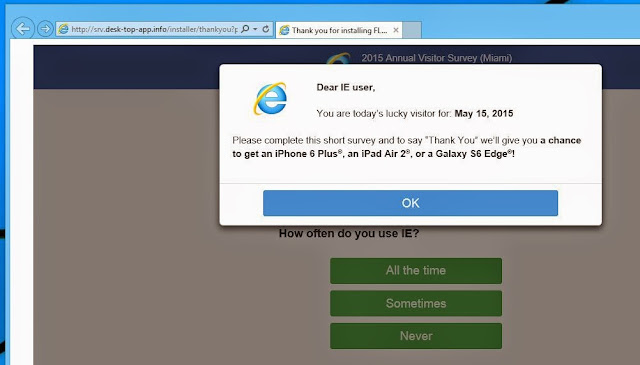
Srv.desk-top-app.info, an advertising platform, is utilized by adware as well as other malicious programs to display pop-up ads within Firefox, Internet Explorer and Google Chrome. Very often, when you click on several links in various sites, a pop-up window or a new tab of Srv.desk-top-app.info displays within Google Chrome, Firefox, or Internet Explorer, then your computer may be currently infected with an adware or a potentially unwanted program (PUP). Technically, this domain is not a malicious itself; however cyber criminals are using an adware program to display ads from this domain to get pay-per-click advertising profits.

How to Remove Loyalty-rewards.org Pop-ups From Chrome/ Firefox/ IE Effectively? - Useful Removal Instructions for XP/ Win 7/ Win 8 Users

What is Loyalty-rewards.org?


Loyalty-rewards.org, an advertising platform, is utilized by adware as well as other malicious programs to display pop-up ads within users' web browsers like Firefox, Internet Explorer and Google Chrome. Very often, when you click on several links in various sites, a pop-up window or a new tab of loyalty-rewards.org displays within your web browsers installed on the PC, then your computer may be currently infected with an adware or a potentially unwanted program (PUP). Technically, this domain is not a malicious itself; however cyber criminals are using an adware program to display ads from this domain to get pay-per-click advertising profits.

How to Remove Goner E-mail Virus From Computer System Effectively? – Useful Removal Instructions

What is Goner E-mail Virus?


Recently, it has been reported that a powerful new computer virus called Goner is able to cause havoc with e-mail systems throughout the world. According to the report, the US, the UK and France are the worst hit of the 17 countries affected so far.

According to experts’ description, Goner is one of the fastest-spreading viruses they had yet seen. Therefore, experts warned that computer users should remove it immediately once they find it on the computer. It is reported that this virus messes mails itself out through e-mail and attempts to destroy anti-virus software on computers. As you can see, it is extremely troublesome for those who unfortunately to receive it. As report goes, the infected e-mail has the word “Hi” as its subject and body text which reads “when I saw this screen saver, I immediately thought about you. I am in a harry (sic), I promise you will love it.” Its attachment is labeled “gone.scr.” So, if you see such an email on your PC, then your computer is infected with Goner e-mail virus and you should take actions to delete it as early as you can to safeguard your PC from further damage.